Transflo Synergize 18.1 Release Notes
Use this KB article to review the current release notes for Transflo Synergize enterprise document management software with business process workflows.
-
Reference ID numbers are sometimes included below as a convenience for customers, support agents, and implementation professionals when they track changes, perform user-acceptance testing, or conduct end-user training.
-
To see Synergize and other exciting enterprise transportation supply chain products and features from Transflo in action, schedule a demo with a Transflo account representative.
 New! Synergize 18.1 Release Notes
The January 2026 release of Synergize 18.1 includes the following new features, updates, bug fixes, and improvements. Reference ID numbers are sometimes included below as a convenience to help support and implementation professionals track changes or perform user-acceptance testing.
Release 18.1 requires Microsoft .NET 8, Synergize Server 18.0 (or higher), Synergize Configurators 18.1, and Synergize Services 18.1.
Synergize Explorer 18.1 HTML5 Edition Updates
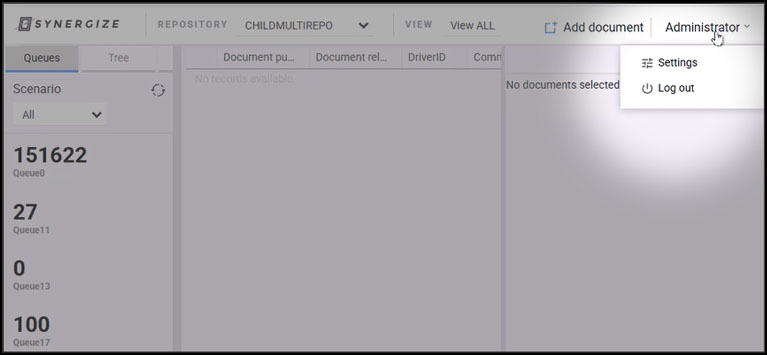
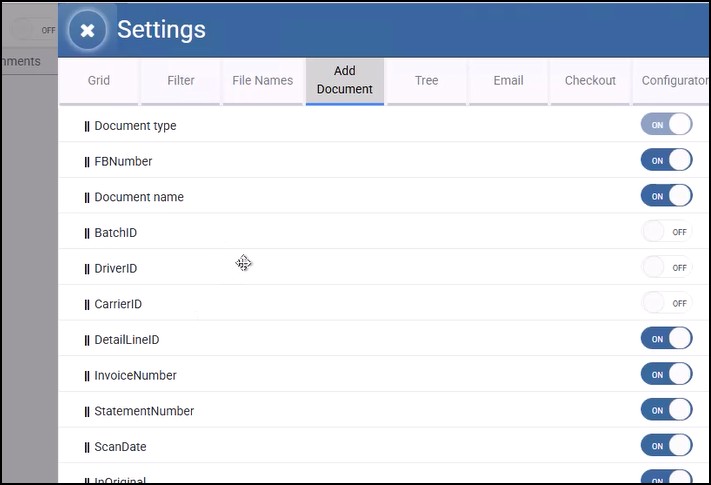
Settings for Field Order and Show or Hide When Adding a Document [330955, 594336]
Synergize Explorer was updated to support accounting and financial projects where advanced users need to rearrange fields and hide unused fields when adding a new document. In previous releases, AR solution users might have to scroll to the bottom to be able to index a field such as FBNumber (freight bill number) and then select the target workflow.
The following steps demonstrate the new functionality:
-
As an administrator or advanced user, click Settings.
-
On the Add Document tab, configure the fields you want to show (ON) or hide (OFF). Drag and drop fields to set the field order. Click Save.
-
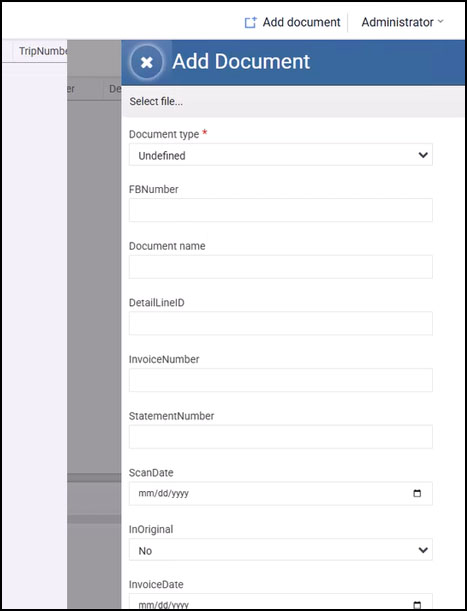
Click Add Document.
-
The Add Document panel shows the fields in the configured order. Hidden fields do not appear.
HTTP Protocol Bug Fix [333672]
This release includes a fix for a previously reported bug where HTTP was not working in Synergize Explorer 18.0.
Synergize Queue Status Monitor Updates
This release includes a bug fix to resolve an issue where the Synergize Queue Status Monitor was not working with Microsoft Office 365 OAUTH protocols [332426, 606026].
Synergize Server 18.1 EMC Updates
The following Synergize Server Enterprise Management Console (EMC) updates were made:
-
Resolved a SOAP issue that was locking the system and preventing concurrent Add Document requests [332367
-
Resolved an issue where the Synergize Queue Status Monitor was not working when using Office365 OAUTH [332426, 606026].
-
Resolved an issue where users received an Object reference not set to an instance of an object error message when attempting to create dynamic views in EMC [333686, 621889].
Synergize 18.1 Components
As of January 2026, with Release 18.1 now available, a typical configuration of Synergize 18.x would have the following components:
-
Synergize Explorer HTML5 18.1.0
-
Synergize Core Server 18.0
-
Synergize Services 18.1.0
-
Synergize QuickLinks HTML5 17.1
-
Synergize Process Server and Process Designer 15.4.0
-
Synergize Desktop 16.0.0
-
Synergize Portal 1.2.5.3
-
Synergize Printer 2.5.0
-
Synergize PDF Extraction Designer 1.0.1.0 (deprecated)
-
Synergize Bulk Print 16.2.0
-
Synergize Web Client 16.2.1
Synergize 18.0 Release Notes
The December 2025 release of Synergize 18.0 included the following new features, updates, bug fixes, and improvements. Reference ID numbers are sometimes included below as a convenience to help support and implementation professionals track changes or perform user-acceptance testing.
Release 18.0 requires Microsoft .NET 8, Synergize Server 16.2.0.5 (or higher), Synergize Configurators 17.1, and Synergize Services 17.1 or higher.
Synergize Explorer 18.0 HTML5 Edition Updates
-
Queue Document Count: The Queue Document Count was updated to indicate the number of high-level parent documents in the queue. In R17.x and previous releases, the count was inflated with the number of parent documents plus any child document field rows. For example, in a queue containing two (2) documents, if one had two (2) child rows and the other had three (3) child rows, the document counter was showing five (5) documents in that queue. The counter now correctly shows two (2) documents. [329936, 582753]
-
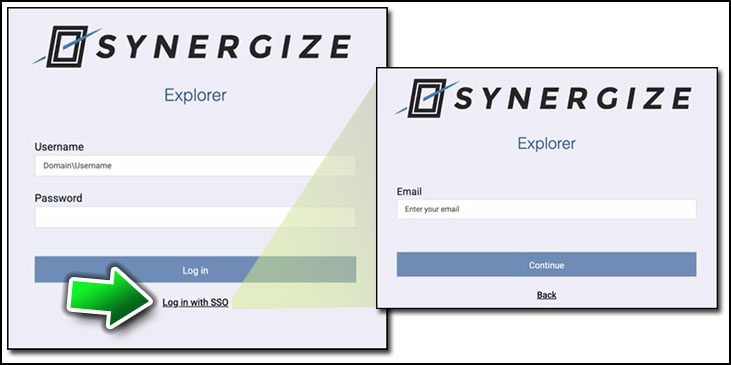
New Single Sign-On (SSO) Link: The Login page for Synergize Explorer checks for an SSO provider in the EMC security model for the current deployed environment. If SSO is configured, a new Log in with SSO link appears. Users can click Log in with SSO to enter their global SSO e-mail address and continue with any multi-factor authentication requirements to log in to Synergize Explorer. [253875, 600656]
The following bug fixes were also made:
-
Bug 333484 resolved an issue that was preventing users from previewing 32-bit-per-pixel TIFF documents that were saved using the Synergize Web client or API in Synergize Explorer HTML5.
Synergize Server 18.0 EMC Updates
The following Synergize Server Enterprise Management Console (EMC) updates were made to support Microsoft Entra security:
-
Administrators can now configure Microsoft Entra ID providers in EMC [251930].
-
Administrators can now configure Synergize repository security for Microsoft Entra ID providers [251931].
-
EMC was also updated to support Microsoft Entra ID security providers for SOAP Web Services [251929].
Synergize 18.x System Requirements
Synergize 18.x server and client system requirements are listed below.
Server
Make sure you have the following components set up on your server:
-
Windows Server 2018 R2 Standard or later (Windows Server 2022 recommended)
-
Microsoft SQL Server 2019 or newer
-
Synergize Server 18.1 (or higher) and Synergize Services 18.1
-
Also ensure that it is configured properly to support Synergize Explorer and Synergize Explorer Integration
Hardware Requirements:
-
Minimum screen resolution of 1366 x 768 (1920 x 1080 recommended)
-
CPU Cores: 2
-
Memory: 8 GB
Client
Make sure you use a system with the following minimum requirements to use Synergize Explorer:
-
64-bit Windows Operating System (Windows 11 or newer)
-
Microsoft .NET 8 or newer
Hardware Requirements:
-
Memory: 4.0 GB (minimum)
Browser Requirements:
-
Modern, standards-compliant 64-bit web browser:
-
Chrome
-
Edge
-
Firefox
-
Screen Resolution Requirements:
-
Minimum: 1366 x 768
-
Recommended: 1920 x 1080


