Mobile+ In-Cab 6.5.15 Release Notes
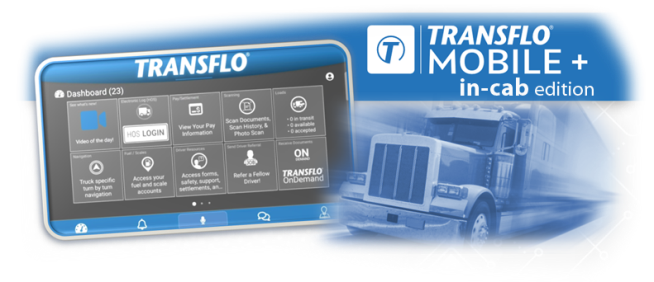
Transflo is pleased to announce Release 6.5.15 of Transflo Mobile+ In-Cab Edition available exclusively for tablet devices running Android 9.0 or newer. This release (which had been delayed 8 to 10 weeks but is now available as of Feb 19, 2026) includes major updates to the in-cab edition of the Transflo Mobile+ app for Android tablet devices.
Devices running previous versions, including the popular legacy 4.6/6.4 release, can soon be updated to our version 6.x unified application base for new features, enhancements, and other performance, stability, and exclusive in-cab edition updates. Release 6.5.15 will also include in-cab scanning and image clarity enhancements that make document capture, adjustment, organization, and submission easy, fast, accurate, and reliable.
More About this Release:
The new 6.5.15 in-cab release has completed extensive rounds of live field testing and now replaces the previous 6.4.2 release.
-
As a driver, you are not expected to download the in-cab edition from the Apple or Google Play app stores. Your fleet administrator or a third-party provider distributes the in-cab edition release updates directly to your tablet device for you.
-
In-cab devices are typically Samsung Galaxy Tab A7 Lite tablets running Android OS 14 with mid-2026 upgrades to Android OS 15 likely.
-
In 2026, in-cab Release 6.5.15 will eventually supersede 6.4.2 which was released last year in February 2025.
-
Customers on 6.4.2 can upgrade to 6.5.15. Customers on any older 6.4.x release can skip 6.4.2 and go directly to 6.5.15. (You will get all the features and updates in 6.4.2 and 6.5.15 plus all the latest bug fixes.)
-
In early 2026, fleet administrators will receive information about the revised release date for the new 6.5.15 update (previously delayed) exclusively for the in-cab edition of the Transflo Mobile+ app.
 Release 6.5.15 Features and Enhancements
The new release of the in-cab edition of the Transflo Mobile+ app includes the following new features, enhancements, and bug fixes:
Crystal-Clear Scans, Every Time
-
Enhanced Image Quality: We boosted our scanning engine with general enhancements that deliver significantly clearer and sharper images.
-
Smart Auto-Focus: No more blurry scans! Our updated auto-focus feature rechecks focus after you press the shutter button, ensuring perfect clarity.
-
Better Lighting with Low-Light Detection: When there's not enough light for a good scan, a low-light alert appears so you always capture the best possible image.
-
Camera Resolution Improvements: Even for older Android devices with fewer than 12-megapixel cameras, our improvements provide a quality boost.
-
Tap to Focus: Added functionality to focus on the area selected.
-
Distance Detection: Scan like a pro, even from afar. A new on-screen indicator lets you know if you're too far away from your document, helping you get the perfect shot.
-
Visual Countdown Timer: A new 3-second timer counts down 3-2-1 to help you remain steady while your tablet device captures the currently detected page.
Multi-Document Mastery
-
Live Multi-Capture: Scan multiple documents in one go! No need to process each one individually – capture everything first, then organize it later. Use the new 3-second timer to help you remain still while your tablet device captures the current detected image before you move to the next paper document.
-
Gallery Multi-Select for Bulk Uploads: Although 97% of all batches contain fewer than five (5) documents (for example, a BOL, fuel receipt, toll receipt, and weight ticket), if you have a stack of document images already in your gallery of local files, you can now upload them all at once for quick processing. You can multi-select up to ten (10) images from your local file gallery at a time. To multi-select on most Android devices, tap and hold down your first selected image. Then you can simply tap your remaining selections. For example, if you need to upload 30 images, select the first 10 and then repeat the tap Upload step to upload the next 10 and then the final 10. Be sure to assign a doc type, crop, or adjust each image in each set of ten (10) before you attempt to add another set of up to ten (10).
-
Streamlined Workflow: Our updated interface is built for multiple documents, making batch scanning and uploading a breeze.

Tip: The new feature that supports stored image multi-select and live document multi-capture is an opt-in feature (isMultiDocEnabled). If you are interested in having this feature enabled, contact your Transflo Customer Success Manager (CSM) or Transflo Support (call, e-mail, or live chat). If your fleet disables the feature, your drivers can still upload multiple load document images in a single batch; however, they simply have to upload each image or capture each live photo for one document at a time.
Effortless Organization and Control
-
Document Type Grouping: Easily find what you need with scans automatically grouped by document type.
-
Multi-Document Preview: Review all your scanned documents at once on the adjustment screen before finalizing.
-
Swipe to Delete: Make a mistake? Quickly remove unwanted documents with a simple swipe.
-
Improved Submission Process: We've refined the button labels when submitting batches that contain only text fields and no documents, ensuring a better user experience.
Enhanced Drivewyze Notification Permission Reminders
On driver tablets with Android OS plus both the in-cab edition of the Mobile+ app and the available Drivewyze functionality, new reminders appear to guide drivers to set a special required permission setting to allow Drivewyze notifications.
Action Needed:
Drivewyze needs access to display bypass alerts when you're driving. Turn ON the Drivewyze Display Over Other Apps setting so that you do not miss important notifications.
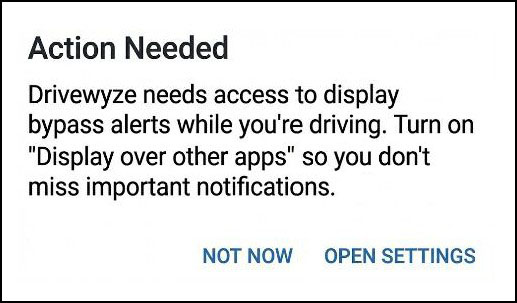
This permission is critical to ensuring Drivewyze notifications are properly displayed. Google policy requires it to be set by the end user. In some instances, this permission may be dismissed or ignored during the installation process. If this permission is not set, notifications cannot be displayed when Drivewyze is running in the background.
If a driver receives this Action Needed message, instruct them to tap OPEN SETTINGS and change the permission from OFF to ON.

In the event a driver navigates away or selects the Not Now option twice, per Google policy they cannot be prompted a third time. However, to ensure the permission does not get ignored and that the needed action is taken, a red banner appears at the top of the Drivewyze screen warning the driver that critical permissions are not set.

To learn more, see Drivewyze in the Transflo Mobile+ App.
Request In-Cab Deployment on Your Fleet Tablets
Third-Party MDM APK Option: As a fleet administrator, contact your mobile device management (MDM) provider and your Transflo customer success manager (CSM) to download the in-cab APK from Transflo (login required). The Transflo CSM can distribute the APK to you or your designated third-party MDM. The CSM also records your scheduled and actual deployment dates.
E2 Option: For Transflo customers who have partnered with eSquared (E2) as their preferred mobile device management (MDM) provider, you can directly deploy as-is or deploy with a short optional user-acceptance testing (UAT) phase:
-
Direct Deploy: Contact your Transflo customer success manager (CSM) to request deployment of the latest in-cab release. Your CSM will record your requested deployment date, enter a Transflo Support case, record the case number, and track your official Deploy date.
-
Deploy with Testing: Contact your Transflo customer success manager (CSM) to request deployment of the latest in-cab release with an optional testing phase. Your CSM records your requested or planned deployment date, enters a Transflo Support case, records the case number, and tracks your limited test deployment date and your requested official Deploy date.
-
For the optional testing phase, provide a list of the tablet serial numbers to be included in the limited deployment and testing program. Since most issues can be identified with just five or ten test devices, we recommend no more than 20 test devices.
-
In a Transflo support case, your CSM records your request for deployment by eSquared only for the listed tablet serial numbers. You should also request an official Deploy date in advance to plan for your actual deployment when your testing period has ended (for example, after 30 days).
-
If you complete your testing early, you can work with your CSM to deploy the latest build without waiting for the test period to end and without waiting for the resolution of any pending issues or new change requests discovered and reported during your optional testing phase.
-
Release 6.4.2 Features and Enhancements
In early 2025, Transflo announced the 6.4.2 release of Transflo Mobile+ In-Cab Edition available exclusively for tablet devices running Android 9.0 or newer.
Release Date: February 20, 2025 | This release package will be replaced by a newer release that is currently delayed.
Release 6.4.2 of the in-cab edition of the Transflo Mobile+ app included the following new features, enhancements, and bug fixes.
Scanning Improvements
This release includes improved document scanning, photo capture, image correction, upload, and send features. Our new scanning and photo capture engine addresses previous user pain points, provides bug fixes, and enhances the user experience across the entire app.
-
Easy One-Touch Settings Button: You can now conveniently tap one Settings button to adjust all scan settings inside the core scanning interface.
-
Users can easily swap between settings on the fly.
-
The app remembers and applies your most recent settings.
-
Added scan support, functionality, and settings for Night Mode.
-
-
Scan Adjustments and Scanned Items Improvements: The following improvements were made on the Scan Adjustments and Scanned Items screens.
-
Added ability to apply selected document type to all pages.
-
Added ability to view multiple documents in Scan Adjustments screen.
-
Added a carousel to the Scan Adjustments screen.
-
Updated how zoom works on the Scan Adjustments screen.
-
Added an animated visual progress indicator on the Scan Adjustments screen to let the user know when documents are loading.
-
Added ability to swipe to delete documents on Scanned Items screen.
-
Updated footer of Scanned Items screen.
-
Added grouping by document type to Scanned Items screen.
-
Added document type selectors to the Scan Adjustments screen and the Scanned Items screen.
-
-
Custom Photo Image Cropping: Save or reset user-defined cropped regions in your scanned documents.
-
When you upload or scan a document you can crop it on the Scan Adjustments screen where five (5) buttons appear: Crop, Rotate, Format, Brightness, and Discard.
-
The app attempts to apply your last saved crop region to your next document.
-
To crop out a different unnecessary region of the page, you can drag the blue dots or grab handles around the document at each corner to crop the image down to show only the exact area you want to keep (the rest is unnecessary and will be hidden or cropped out from further view).
-
Users can also take advantage of a second Crop button that now appears on the Scan Adjustments screen where they can choose from the following three (3) Crop Image options:
-
Crop: To apply your current crop region to the document and save that same cropping shape or region so it can be applied by default to future documents to save you time, tap Crop. For example, maybe you often want to crop out the top 2-inches of all pages.
-
Reset: If you adjusted the last saved cropping region (you moved the blue dots) but want to discard your changes and revert to the last saved crop region, tap Reset.
-
Cancel: To cancel any crop adjustments, revert to the original document, and go back to the Scan Adjustments screen, tap Cancel.
-
-
-
Additional Scanning Improvements:
-
Enabled multi-selection within the native photo picker.
-
Updated the bad image and blurry image warnings to assist the user.
-
Depending on your fleet configuration, adding signatures can now be included as part of the final steps before submitting a batch.
-
Embedded Deep Link Improvements
-
Primarily for our larger customers who may be required by shippers to use commercial third-party apps such as Vector during load delivery, this release now supports embedded load document deep links.
-
Added deep link functionality for Netradyne and the FleetCor DRIVEN FOR COMDATA™ app.
-
Added EFS deep link support and additional new deep links for other apps.
Navigation and Usability Enhancements
-
The in-app message prompts that remind you about required device camera permissions and location access permissions have been improved.
-
Added a new ≡ Actions menu (often called the hamburger menu icon at top left) to provide access to the new Document Queue feature.
-
Added the Context menu (also known as the Options menu indicated by ellipsis... or 3 dots) on the integrated HOS screens.
-
Suppressed any blank fields on the Load Details screen.
-
General bug fixes and quality enhancements.
About Transflo Mobile+ In-Cab Edition
The popular Transflo Mobile+ app for commercial motor vehicle truck drivers is available in three (3) main ways:
-
Standard mainstream app (the popular commercial app with over one million downloads available at no charge in both the Google Play and Apple app stores)
-
In-cab edition (for Android tablets that typically remain in the truck; not available at the app stores; this KB article is about the in-cab edition)
-
Custom (white label) app (with custom fleet features; available through the two mobile app stores)
The in-cab edition of the Transflo Mobile+ app typically remains in the truck to support one dedicated driver or multiple drivers in a team driving (or slip-seating) arrangement where drivers simply take the next available truck. The in-cab edition of Mobile+ runs exclusively on touchscreen tablet devices with the Android mobile operating system.
Contact Your Fleet Administrator to Determine if You Are Using the In-Cab Edition
As a driver, contact your fleet supervisor to determine if you should be using the standard Transflo Mobile+ app (as about 85% of drivers do) or a special edition such as a white label custom-branded edition for your company or the special in-cab edition.
Your fleet administrator distributes the in-cab edition release updates directly to your tablet device by installing an APK file. You cannot download the in-cab edition from the Apple or Google Play app stores. Controlling and managing the release updates are primary reasons why fleets want to use the reliable in-cab edition of the Transflo Mobile+ app.
Notes for Drivers Who Use In-Cab and Mobile+ on Their Own Personal Device
-
You cannot remain logged in to the HOS, ELD, and Telematics app or online portal on multiple devices. Use the HOS features on one and only one device at a time. For best results, use the in-cab system and log out when you are done driving.
-
To log in, the mobile app does not require a driver ID but the in-cab edition does.
-
If you want to view your loads on both the in-cab system and on your own mobile device, your login credentials must be exactly the same.

|
Reminder: Transflo is the premier provider of popular commercial apps, custom white label apps, in-cab tablet editions, embedded handset editions, and thousands of additional fleet-specific integrated features. Due to all the possible product configuration changes for your specific fleet, it is possible that user interface labels, buttons, links, dials, tiles, icons, colors, logos, and placement on the screen can vary. Features can also be hidden from your view based on customer account, fleet ID, or user permissions. In the documentation, we cover a default setup with screen examples that are generally similar for smart phones and tablets running either iOS or Android OS. Adjust certain steps, if needed, to reflect your actual device, product configuration, and company policies.
|


