Mobile+ v5.4.4 Release Notes
The v5.4.4 release of the Transflo Mobile+ app in October 2022 included the following new features, enhancements, and bug fixes. Users can expect the updated app to be available as early as Monday, October 3, 2022.
To learn more about the latest available updates, see Transflo Mobile+ App Release Notes.

Tip: Most of the updates apply to all users on all devices; however, the exact date of deployment of the updated app and scope of the changes often vary by individual user due to different fleet configurations, the features you use or do not use, your mobile operating system, your mobile device type (phone or tablet), and whether you have your Auto-Update setting ON or OFF.

|
Reminder: Transflo is the premier provider of popular commercial apps, custom white label apps, in-cab tablet editions, embedded handset editions, and thousands of additional fleet-specific integrated features. Due to all the possible product configuration changes for your specific fleet, it is possible that user interface labels, buttons, links, dials, tiles, icons, colors, logos, and placement on the screen can vary. Features can also be hidden from your view based on customer account, fleet ID, or user permissions. In the documentation, we cover a default setup with screen examples that are generally similar for smart phones and tablets running either iOS or Android OS. Adjust certain steps, if needed, to reflect your actual device, product configuration, and company policies.
|
 Android
Features and Enhancements:
-
Improved Load Sorting: Added the ability to sort accepted loads by shipping date, delivery date, load number, or bill of lading (BOL) number.

-
Improved Display of Load Data: Increased legibility on various pages within the app with a primary focus on improving the way load information appears to users. Text size, spacing, padding (blank white space around text), and other visual design elements were adjusted to improve the end user experience.
-
Enhanced CoPilot Navigation: CoPilot navigation has been enhanced by removing already completed steps when CoPilot is relaunched. CoPilot has also been updated to the latest version in order for users to have current features and bug fixes.
-
Improved Location Activity: Mobile+ users with integrated Transflo Unite functionality (features optimized for shipments including GeoFence awareness of driver proximity to pre-defined pickup locations) now have their location activity always turned on. As a primary benefit of this improvement, their location is much more accurate on map pages. Associated web views for drivers, shippers, brokers, and carriers can now access a near real-time exact location that is more precise that previous releases that relied exclusively on when the device last sent its location to the server.
-
Hours-of-Service (HOS) Improvements: This release includes the following enhancements for hours-of-service (HOS) duty status and team driver features that maximize your use of a required electronic logging device (ELD):
-
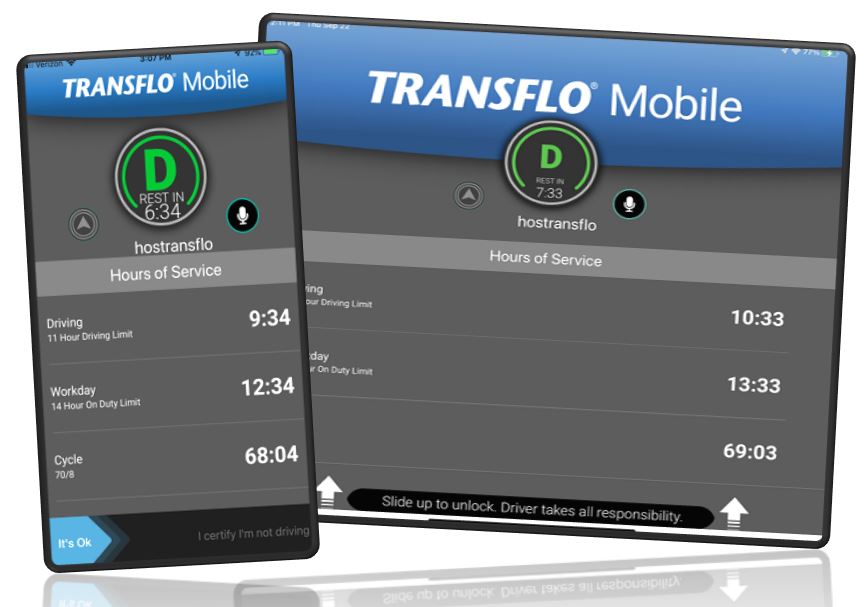
Improved HOS Display Options: Added the ability to display hours-of-service (HOS) information on the lock screen, dashboard, and during CoPilot navigation for the designated driver.
-
Improved HOS Display Consistency: Updated the user interface for HOS dials on tablets to be more consistent across all pages. There should not be any color shift inconsistencies within the app.
-
Improved ELD Team Driver Support: This release now allows team drivers to use one device on the road.
-
Bug Fixes:
-
Fixed a bug that caused the app to crash if the user interacted with certain notifications.
-
Fixed a bug that caused incorrect hours-of-service (HOS) information to appear after switching users.
-
Fixed a bug that caused the driving status to not change for a co-driver after they become the active driver.
-
Fixed a bug that prevented the user from opening PDFs in app.
-
Fixed a bug that caused the app to crash when the user tapped the HEY TRANSFLO Voice Assist button to activate the speech recognition feature.
-
Fixed a bug that caused the keyboard to remain open after the user has logged in or registered.
-
Fixed a bug that cause the incorrect fleet management header user interface to show.
iOS
Features and Enhancements:
-
Improved Load Sorting: Added the ability to sort accepted loads by shipping date, delivery date, load number, or bill of lading (BOL) number.
-
Improved Display of Load Data: Increased legibility on various pages within the app with a primary focus on improving the way load information appears to users. Text size, spacing, padding (blank white space around text), and other visual design elements were adjusted to improve the end user experience.
-
Enhanced CoPilot Navigation: CoPilot navigation has been enhanced by removing already completed steps when CoPilot is relaunched. CoPilot has also been updated to the latest version in order for users to have current features and bug fixes.
-
Enhanced Date and Time Format Consistency: Standardized the date and time selection throughout the app. Previously, the date and time formats sometimes varied by device (phone or tablet), page, or app view.
-
Hours-of-Service (HOS) Improvements: This release includes the following enhancements for hours-of-service (HOS) duty status and team driver features that maximize your use of a required electronic logging device (ELD):
-
Improved HOS Display Options: Added the ability to display hours-of-service (HOS) information on the lock screen, dashboard, and during CoPilot navigation for the designated driver.
-
Improved HOS Display Consistency: Updated the user interface for HOS dials on iPads to be more consistent across all pages. There should not be any color shift inconsistencies within the app.
-
Improved ELD Team Driver Support: This release now allows team drivers to use one device on the road.
-
Bug Fixes:
-
Fixed a bug that caused new users to see the notifications from deleted or previous accounts on some devices.
-
Fixed a bug that caused the user email address and fleet name to not be visible on some iPads.
-
Fixed a bug that caused the user to be logged out even if they cancel the logout process.
-
Fixed a bug that caused the user to see an incorrect number of unread notifications after logging out and then back in on a device.
-
Fixed a bug that caused CoPilot to not navigate if the user cleared the trip within CoPilot prior.
-
Fixed a bug that caused two driver icons to appear upon opening Map View.
-
Fixed a bug that caused the user not to see an error message after submitting an accident claim or photoscan without an image.
-
Fixed a bug that caused duplicate photos to be added if the user tabs multiple times during the photo selection process.
-
Fixed a bug that caused the History and Services page in Drivewyze to fail to load.
-
Fixed a bug that caused the Fragile and Adhesive tags within loads to overlap.


