Register, Add, or Remove a Team Driver [retail driver retailadmin administrator hos-app tfm]
Shared team driving is supported by the HOS and telematics features of your Transflo Geotab ELD. As an administrator, you can add or remove drivers in the HOS Registration web portal. Your drivers can access HOS and ELD features on their mobile device using the Transflo Mobile+ app or the Transflo HOS app.
The Transflo Mobile+ app with your Geotab ELD supports team drivers, co-drivers, or codrivers. As the primary driver (first driver in the driver seat), you can add a team driver or a co-driver (second driver).
-
When you add a driver, you are inviting them to self-register.
-
After they register, they are available in the system as one of your team drivers associated with you, your ELD, and your vehicle.
-
You can now change drivers or switch drivers in your HOS settings and tap on who is in the driver seat.
 Invite a New Team Driver to Register [retail driver retailadmin hos-app]
For team driving, both drivers must have separate usernames and passwords. Customers who purchased their ELD from a retail location such as Loves, Pilot, or TA can invite other drivers to register and share driving with the primary driver on the same ELD.
-
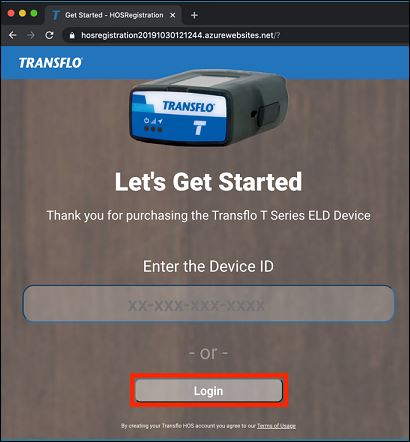
As the primary driver or owner of a retail Geotab electronic logging device (ELD), navigate to https://hos.transflo.com/ and click Login.
-
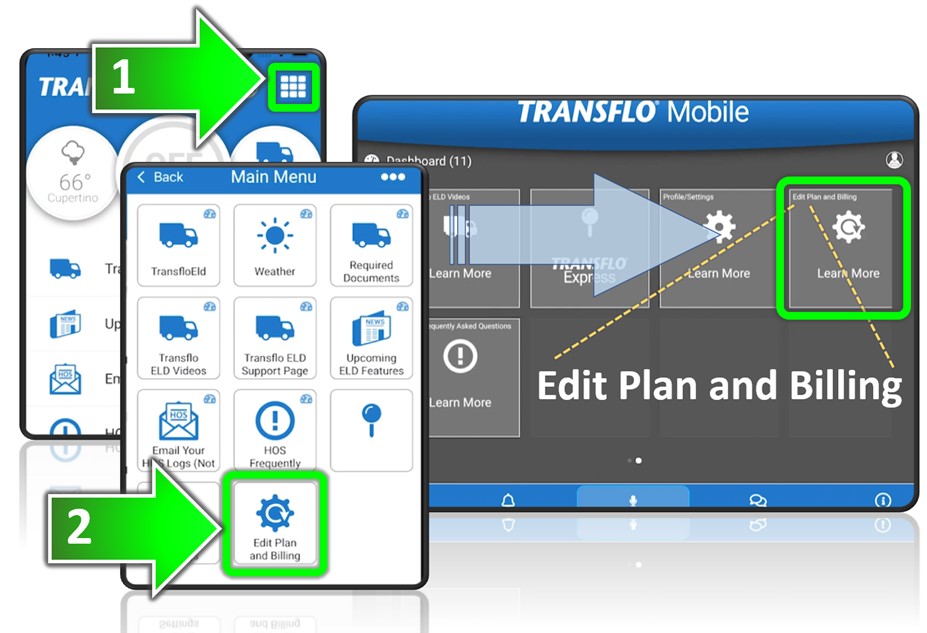
You can also use your Transflo HOS app. On a tablet, swipe right in the dashboard and tap Edit Plan and Billing. On a smart phone, tap Main Menu and then tap Edit Plan and Billing.
-
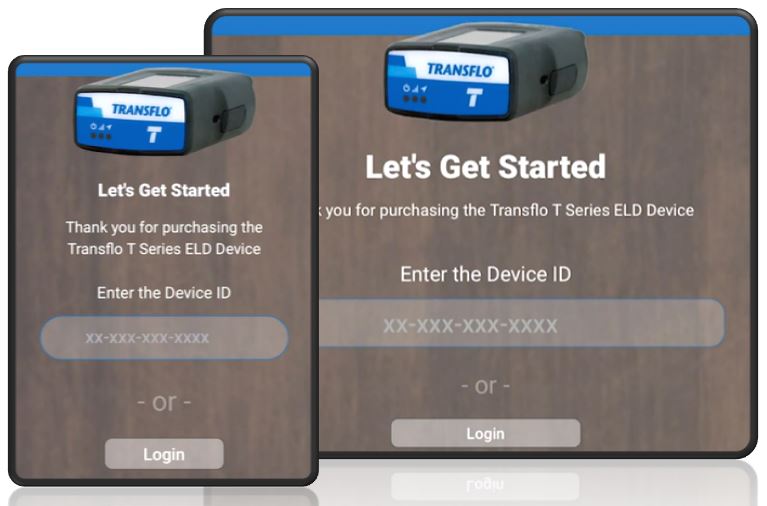
In the HOS web portal, click Login. (You already entered your device ID when you registered.)
-
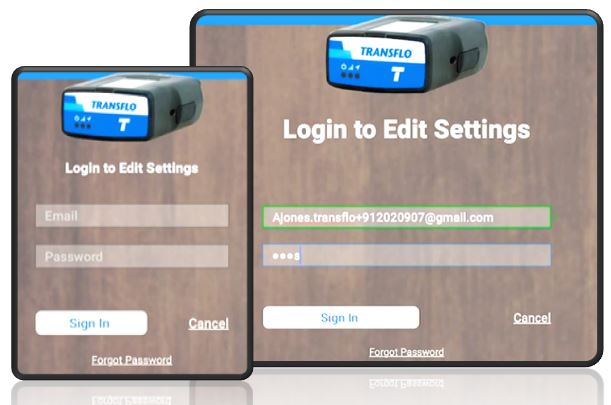
As the owner or primary driver, enter your username (email address) and password. Click or tap Sign in.
-
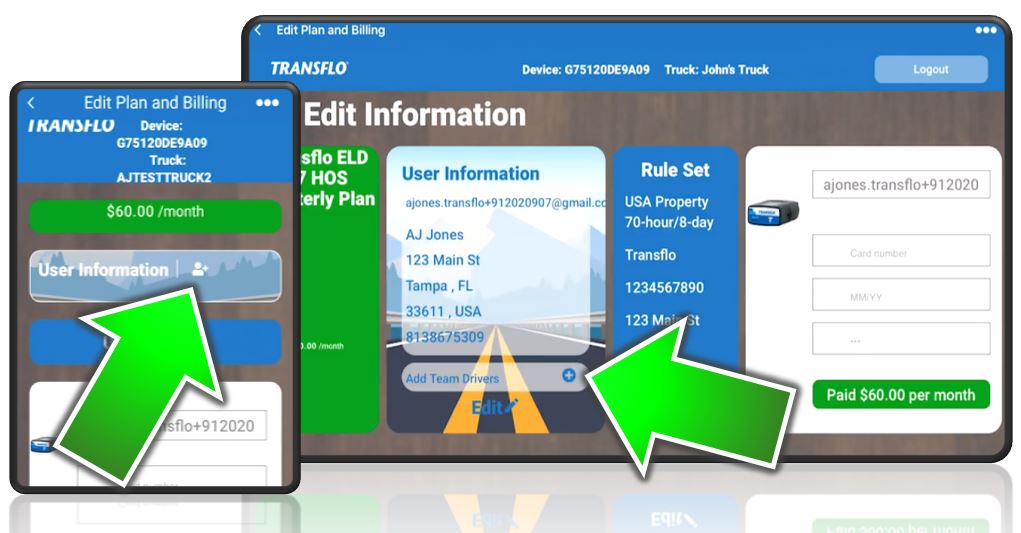
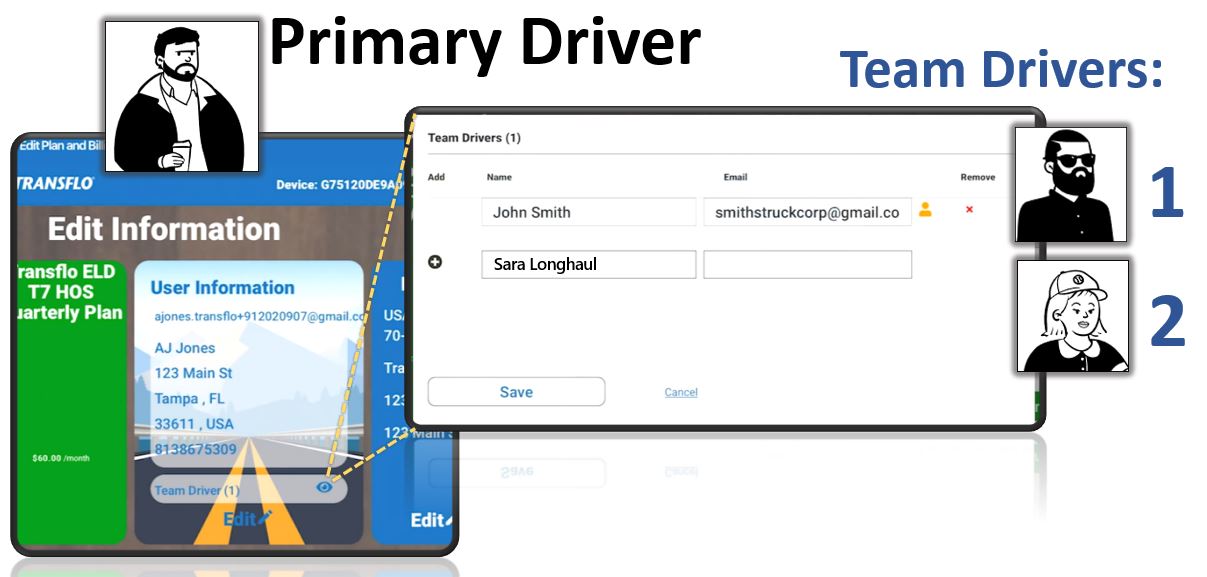
Under User Information, tap + Add Team Driver.
-
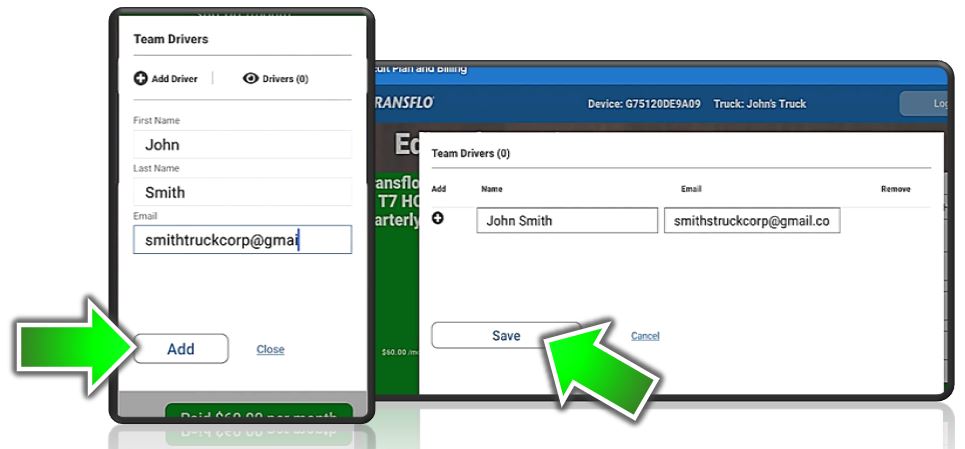
Enter the name and email address for team driver 1 and tap Add or Save.
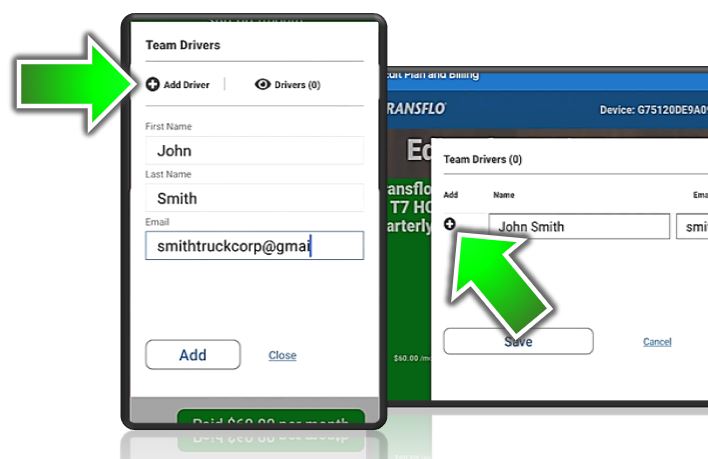
- To add another team driver, click + Add Driver.
-
As the primary driver, you can now logout until the following events occur:
-
Allow up to a day or two for the team driver you added to receive their invitation in their email inbox and complete their Transflo registration.
-
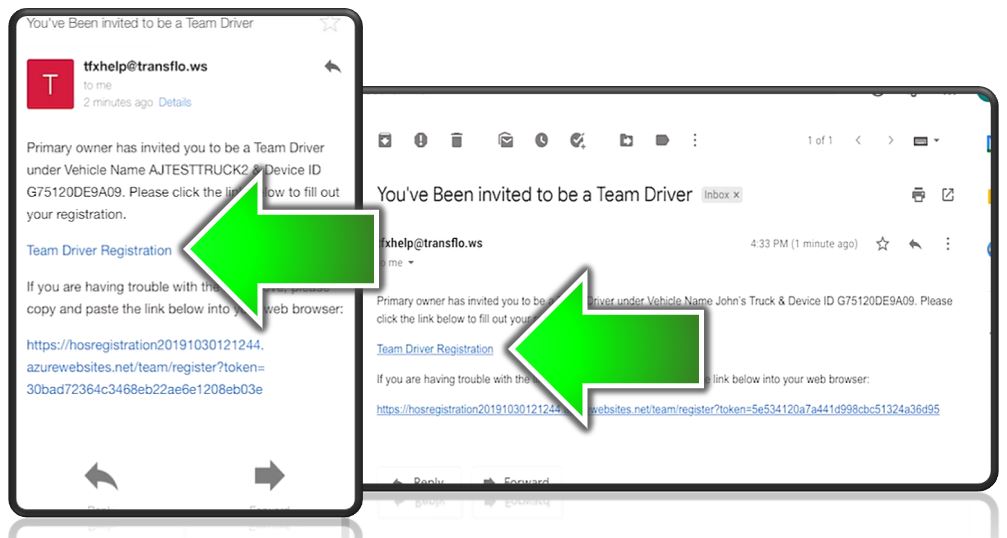
Tell your driver to open the invite in their email inbox on any device or computer and tap or click Team Driver Registration.
-
The new team driver must register by entering their email and a password of their choice twice to confirm the fields match. They click I'm not a robot to complete their registration and click Next.
-
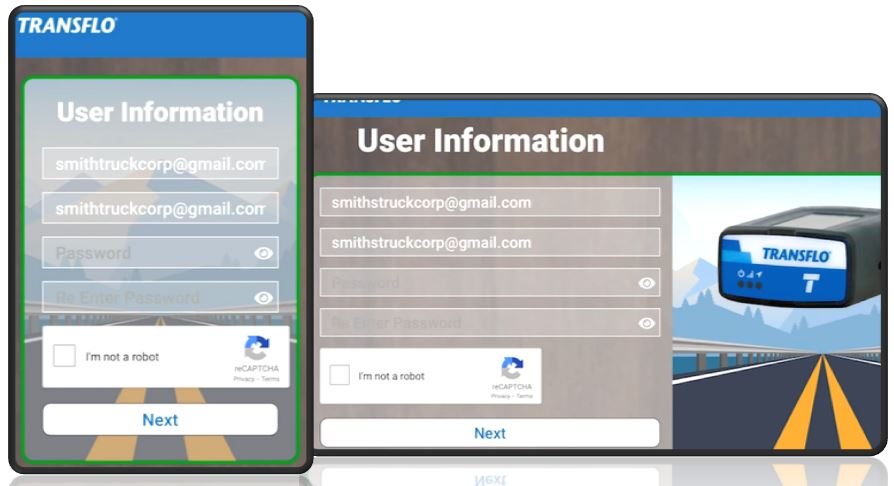
-
-
As primary driver, log back in to the HOS web portal (repeat the first few steps above). You now see the registered team drivers under User Information.
Switch Team Drivers for a Fleet [retail driver tfm]
-
Both drivers must be in the database as separate registered users.
-
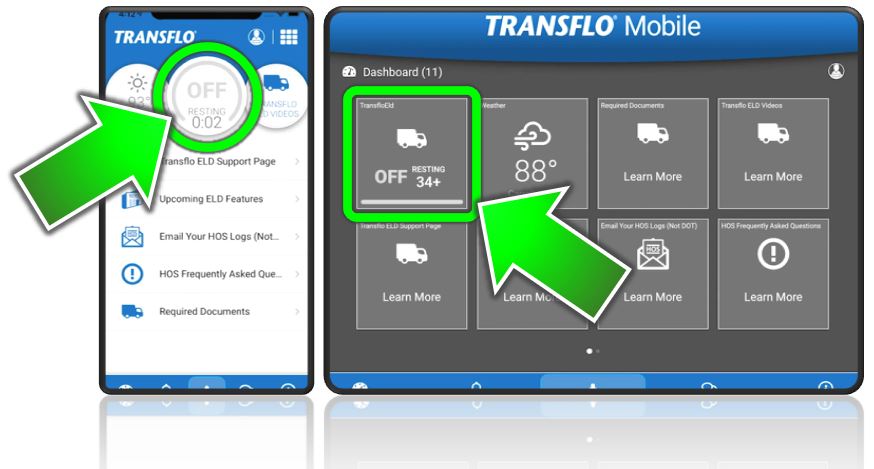
The first driver logs into Transflo HOS and opens the HOS Electronic Logs portion of the app. As the primary driver, tap your HOS status in the mobile app (this feature requires 5.4.4 or newer).
-
Before you can switch, verify you already set yourself up as the active primary driver and you invited one or more team drivers. Your fleet admin might prefer to add drivers so you might not have the ability to add team drivers. In fact, your screen might not show the option. You can still switch the active driver in a later step. Skip ahead.
-
If you have the option, select the HOS
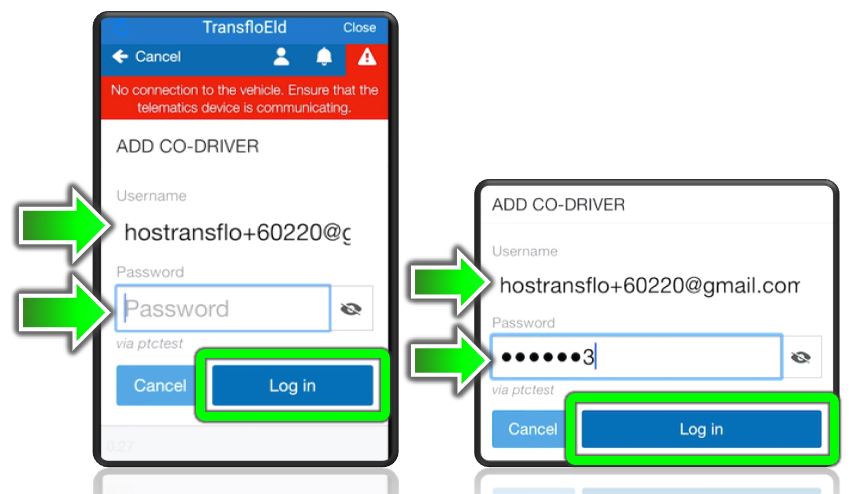
 User icon and then tap + Add Driver.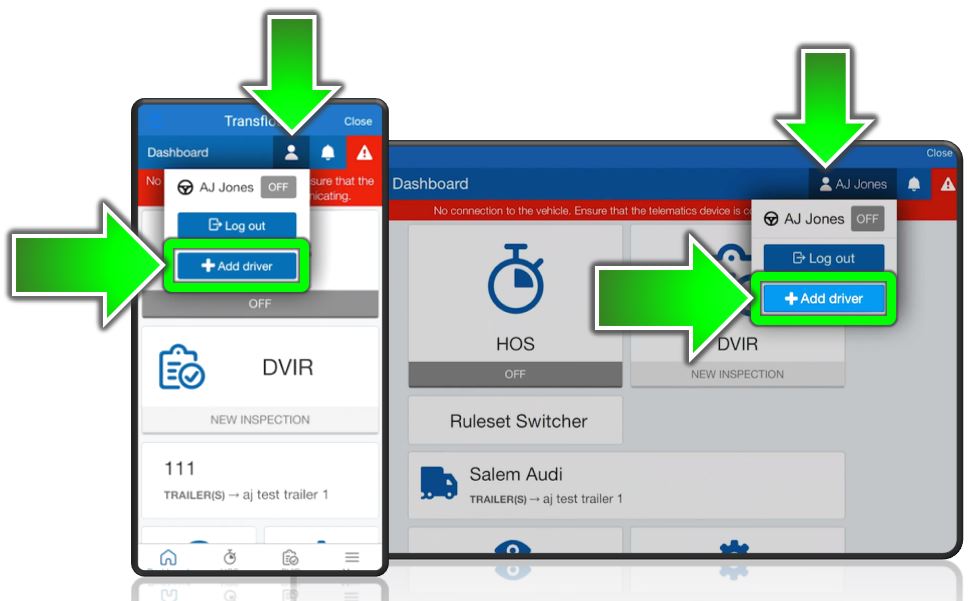
-
Physically hand your mobile device (smart phone or tablet) to the team driver.
-
As a new team driver:
-
Enter your own username and password.
-
Tap Log in.
-
Give the mobile device back to the primary driver.
-
-
-
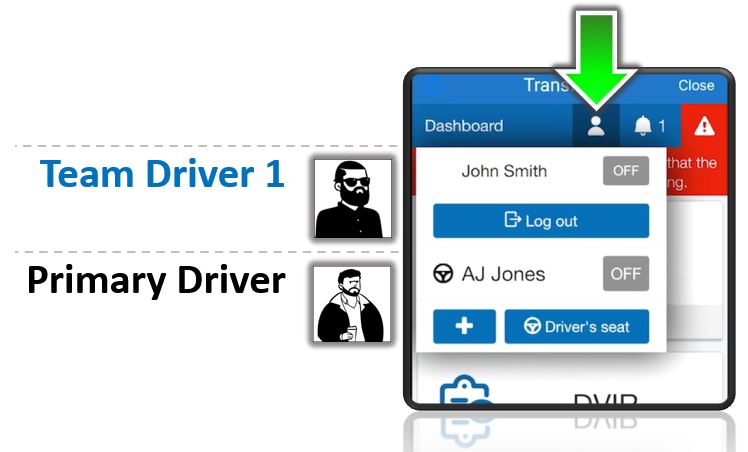
After you add the driver or your fleet admin adds the new driver, both drivers appear under the User menu. As primary driver, tap the
User icon.-
Both the primary driver and team driver now appear.
-
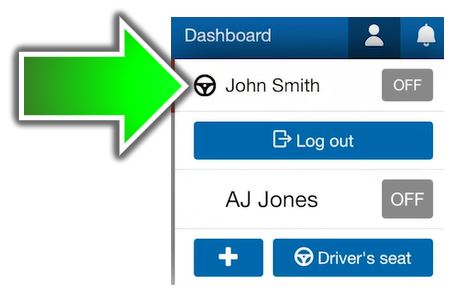
The black steering wheel indicates the current active driver.
-
The ELD logs are tracked for the active driver. The active driver receives all logs that the Vehicle/ELD puts out.
-
-
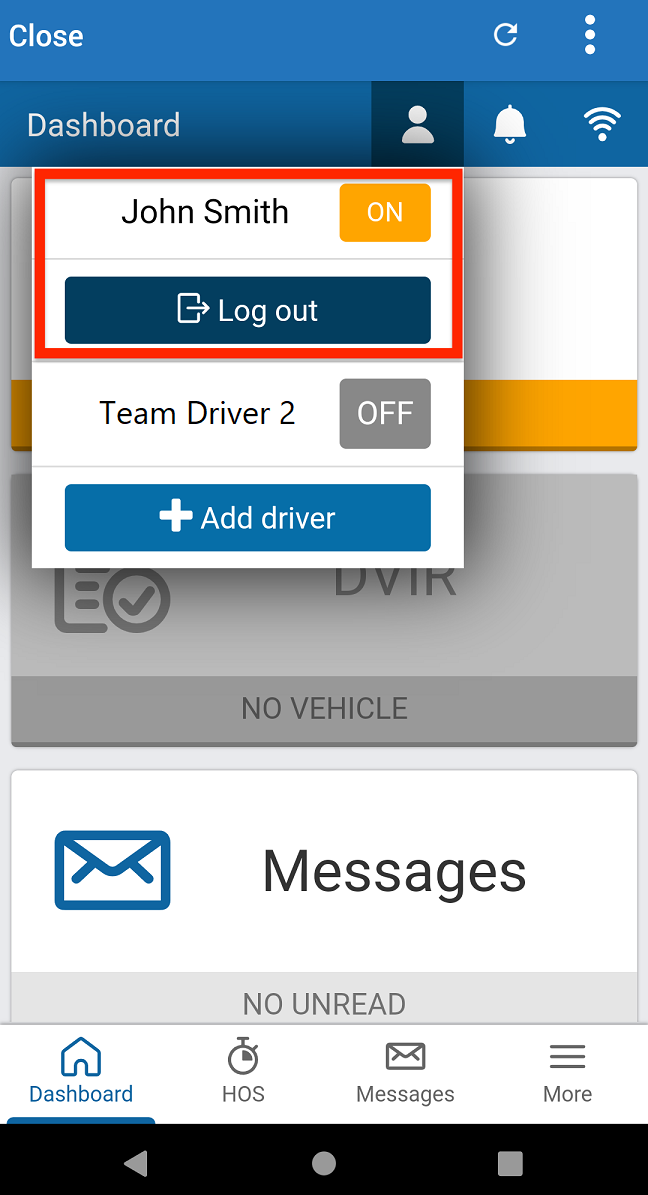
The Log out button under the driver name indicates that the driver is active in the vehicle. To switch drivers, the active driver needs to switch to either OFF or SB. Tap the User icon, then tap the driver name with the dark blue Log out button under it. Do NOT tap Log out.
-
Set the HOS status of the active driver (you) to OFF or SB.
-
After switching to OFF or SB, tap the
User icon and then tap the Driver’s seat button. Choose which driver should be the active driver.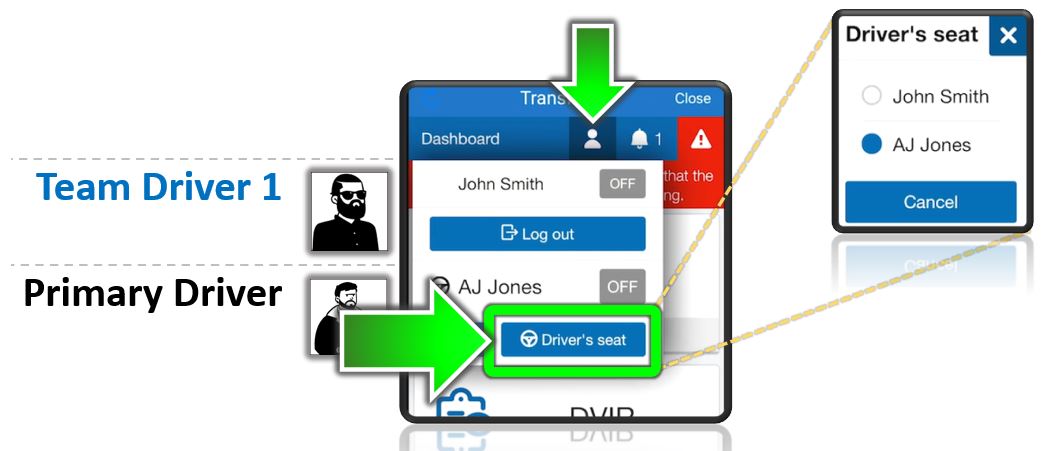
-
The steering wheel is now on the active driver you selected. All logs that the ELD maintains for the current vehicle are assigned to that driver. The other driver remains in whatever mode they were set to (OFF or SB).
-
You have switched the active driver. This change is temporary and you can switch drivers again. Stop here unless you also want to switch the primary HOS user.
-
(Optional) To switch the primary user, select the
User icon and tap that username in the list. The user listed at the top is now the active user. Any information changed or displayed in the app including ELD logs is now for this user.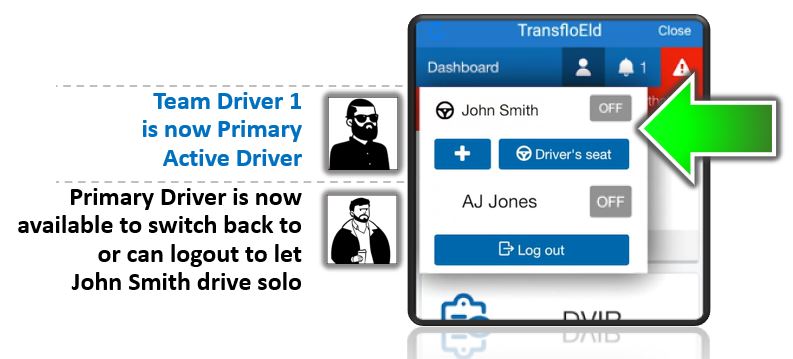
-
If you were the original primary driver and user, you can now log out if you want. To log out a driver, tap the Log out button under your name.
-
The new active driver (who is also now the primary user) can keep driving solo and can even invite and add their own team drivers if permitted.
-
Add a Team Driver During ELD Registration [retail driver retailadmin hos-app]
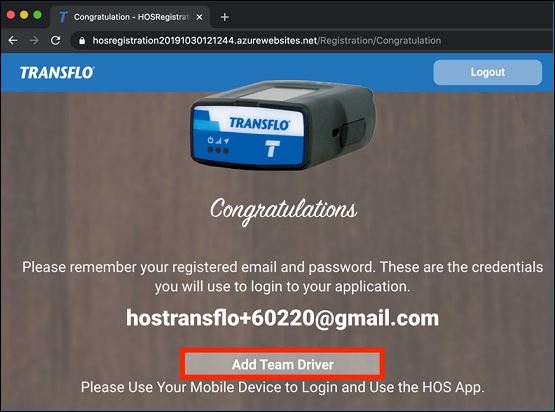
When you register a new ELD (retail customer accounts), you can take advantage of an optional Add Team Driver button to invite a new team driver.
-
Complete all the first-time new ELD registration steps. See Register a New ELD and Start Using Transflo HOS [retail driver retailadmin administrator hos-app tfm]
-
As a first-time registered user, after you successfully add your credit card in the HOS Registration website and reach the Congratulations screen, click the Add Team Driver button.
You can also go back later and find the Add New Driver option on smart phones or tablets as shown below:
-
Enter the Name and Email of the first driver.
-
To add more drivers, click
 Add.
Add. -
To remove a driver, click
 Remove.
 -
When finished, click Save.
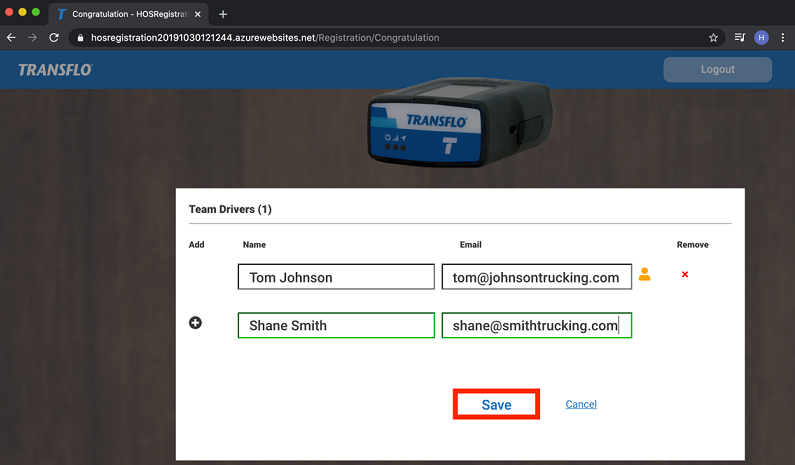
- The system sends each driver that you added an email message with links to the registration page where they can complete their new user registration.
Remove Co-Drivers from MyGeotab Transflo Telematics [retail fleet retailadmin administrator gtportal]
You can also use the Transflo Telematics My Geotab web portal to remove team drivers (co-drivers):
This is technically possible, but is not a best practice and should be done only as a last resort to correct logs if a team driver unnecessarily stayed logged in.
-
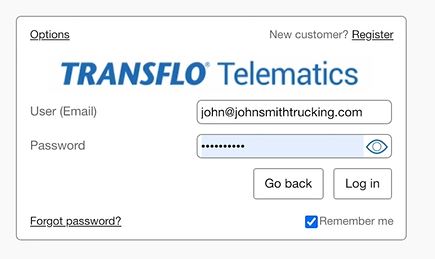
Log in to the Transflo Telematics web portal with the same credentials you use to log in to your existing Transflo Geotab applications.
https://my.transfloeld.com/your-database-name
-
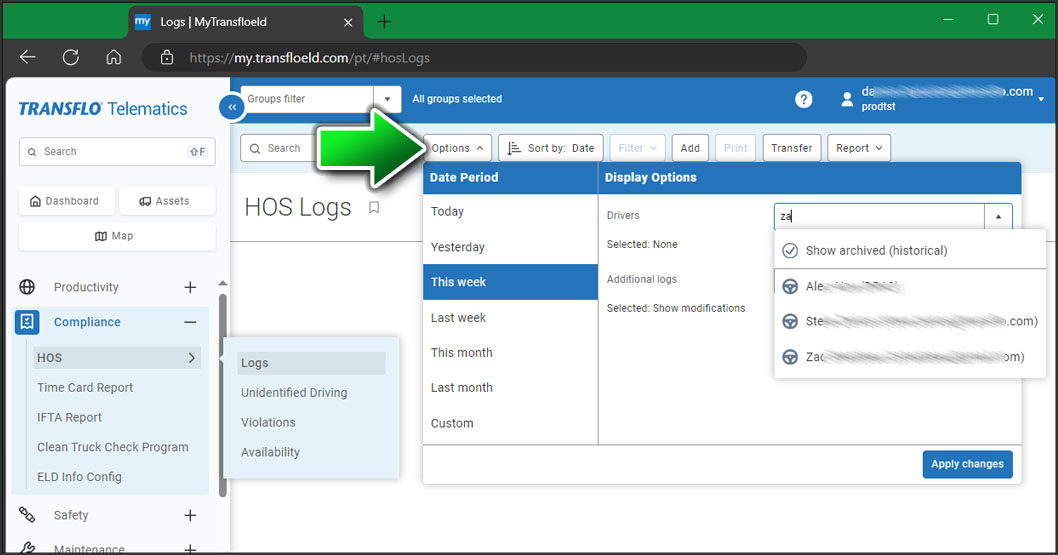
In the left navigation menu, expand Compliance and click HOS, Logs.
-
On the HOS Logs page, click Options:
-
Select a Date Period such as Today, This Week, Last Week, or define your own custom date range.
-
Select a driver.
-
add additional logs if necessary
-
Click Apply Changes.
-
-
On HOS Log Edit page, click the down arrow besides co-drivers
-
Click Remove all.
-
Add a proper annotation.
-
Click Save.
Coming Soon! Improved Team Driving
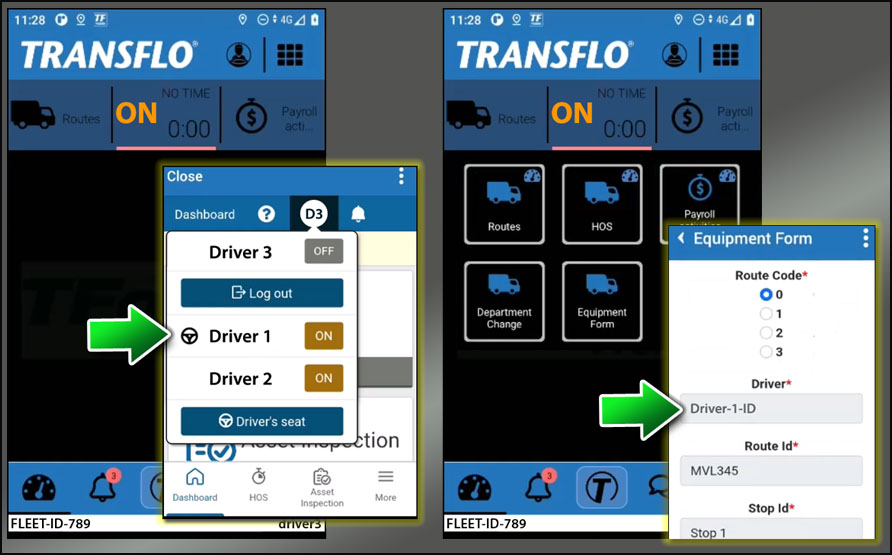
Release 6.7.2 for certain fleets and upcoming 2026 releases are scheduled to improve the team driving experience by supporting more consistent and persistent functionality when switching drivers. In future releases, when the driver in the driver's seat is selected in HOS, that driver's ID and similar ELD user data is carried into the Mobile+ app and automatically inserted where it might appear in the app such as an on-screen form.
When a member of the team switches to the active team member, Transflo Mobile+ will log out the current team driver and present them with a message confirming the log out. The new co-driver can now enter their user credentials and log in. When a team member switches, they must re-confirm the vehicle they want to connect to when using Geotab HOS.
Example: In this example, Driver 1 is the current driver selected in Transflo HOS. Later, when an equipment form is opened in the Transflo Mobile+ app, the ID for the currently active team driver is automatically inserted into the Driver field. An HOS change to Driver 2 would auto-insert the ID for that driver in similar forms in the Mobile+ app.
 View a demonstration of these steps in one or more Transflo videos:
Add a Team Driver:
Register a Team Driver
Switch Drivers


