Mobile+ v6.0.1 Release Notes
The Mobile+ 6.0.1 update (and 6.0.3 patch) supported new connections to Geotab Marketplace, route and fuel optimization (Manhattan Fuel & Route, Expert Fuel, and more), and custom integrated solutions from Assured Telematics Inc. (ATI), now part of the Transflo family. With expanded route and fuel optimization and deep integrations with supply chain telematics giants like Geotab and ATI, Transflo Mobile+ 6.0.1 and 6.0.3 continued to lead the industry as the Everything App for Truck Drivers.
The v6.0.1/6.0.3 update to the R6.0 Transflo Mobile+ app in October 2023 included the following new features, enhancements, and bug fixes. Users can expect the updated app to be available in a phased roll-out as early as October 2, 2023 with most user devices receiving the updated app by November 1.
 Features and Enhancements:
The new features, enhancements, and bug fixes in this patch are the same for iOS and Android.
-
CoPilot Route Optimization: Release 6.0.1/6.0.3 adds the ability to pass routes from optimization software into CoPilot. Customers who leverage Transflo for CoPilot can now get optimized route information from Manhattan Fuel & Route, Trimble Expert Fuel, and other providers. In Transflo Mobile+, drivers can seamlessly leverage these routes inside the familiar CoPilot navigation experience.
-
GeoTab SDK Enhancements and ATI Integration Support: This release patch adds support for the GeoTab Drive SDK. Customers leveraging Transflo Mobile+ for HOS/ELD can also take advantage of mobile-specific ATI add-ons such as driver notifications about unverified logs. With Release 6.0.3, Transflo Mobile+ now offers seamless integration with Assured Telematics Inc. (ATI). A basic set of ATI GeoTab add-ins are now available free of charge to all current Transflo-GeoTab customers. These add-ins are designed to help small owner-operators and large fleet managers alike with their daily mission to optimize driver efficiency, improve HOS compliance, and reduce HOS log audit infractions.

Tip: Transflo Mobile+ now supports most GeoTab marketplace add-ins. A list of current offerings is available at marketplace.geotab.com.

Note: For the best integrated experience with Geotab ELDs, ATI HOS add-ins, and the Transflo Mobile+ app, make sure your drivers are using version 6.0.3 of the Transflo Mobile+ app or a newer release.
-
Vector Document Deep Link Improvements: Primarily for our large customers who may be required by shippers to use commercial third-party apps such as Vector during load delivery, this release now supports embedded load document deep links.
-
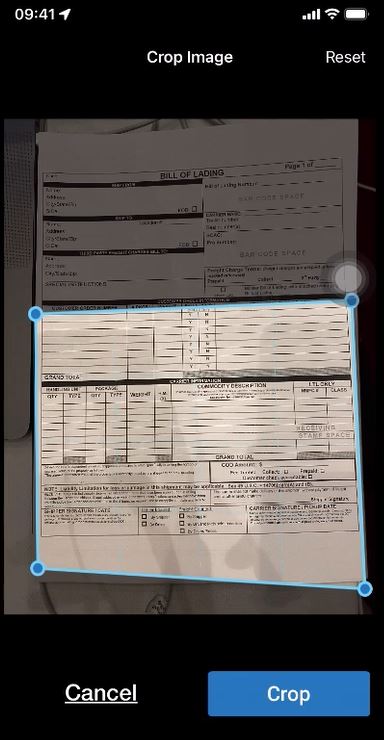
Save or Reset User-Defined Cropped Regions in Your Scanned Documents: When you upload or scan a document you can crop it on the Scan Adjustments screen where five (5) buttons appear: Crop, Rotate, Format, Brightness, and Discard. The app attempts to apply your last saved crop region to your document. To crop out a different unnecessary region of the page, you can drag the blue dots or grab handles around the document at each corner to crop the image down to show only the exact area you want to keep (the rest is unnecessary and will be hidden or cropped out from further view).
New in 6.0.1/6.0.3 is the ability to choose from the following three (3) Crop Image options:
-
Crop: To apply your current crop region to the document and save that same cropping shape or region so it can be applied by default to future documents to save you time, tap Crop. For example, maybe you often want to crop out the top 2-inches of all pages.
-
Reset: If you adjusted the last saved cropping region (you moved the blue dots) but want to discard your changes and revert to the last saved crop region, tap Reset.
-
Cancel: To cancel any crop adjustments, revert to the original document, and go back to the Scan Adjustments screen, tap Cancel.
-
Bug Fixes:
-
General bug fixes and enhancements.


