Reset My HOS Password fleetdriver tfm
If made available to you, you can reset your HOS (Geotab user) password in your Transflo HOS or Mobile+ app; otherwise, contact your administrator for a password reset.
 Drivers: Reset My HOS Password fleetdriver tfm
As a driver for an enterprise-wide fleet ELD customer (instead of a monthly account you have an ELD contract with Transflo), if you forgot your Geotab HOS password, you can call your supervisor to have them reset it in the Transflo Telematics portal (powered by MyGeotab).
If made available to you, you can reset your password in the app; otherwise, contact your administrator for a password reset. Check with your fleet administrator or training team to learn which option they recommend.
Many large fleets manage all driver credentials and passwords, so if you cannot reset your own password by yourself using the app, contact your fleet administrator. If your company is using a data pattern for credentials, your admin can help you remember what it is. For example, reg3445TN is a password that could represent a pattern or convention using the initials for your first, middle, and last name, followed by the last four digits of your mobile phone number, and ending with a two-letter abbreviation for your home state.
Why is My HOS Account Locked? fleetdriver tfm
As a security feature in these modern times of phishing attacks, malware, and the dark web, it is possible for you as a driver or ELD user to lock yourself out of your own account.
How? You might accidentally set off the session timeout (user lockout) feature in MyGeotab if you attempted to login and reached the maximum number of failed login attempts during the authentication period. For example, if set to four (4) attempts and you tried unsuccessfully to log in four (4) times, you will be locked out for up to 30 minutes.
Follow these steps:
-
Remember your password and enter it carefully next time. You don't want to be locked out. It's no fun.
-
If you are locked out (it happens, don't beat yourself up) try to be patient and remember your account is locked to prevent some bad actor out there from repeatedly hacking their way into your account through brute force.
-
Do not try to reset your own password during lockout. You cannot click Forgot Password during the 30-minute lockout time.
-
Even if you suddenly remember your password, you are still locked out. That's how a good security lockout feature works.
-
If you cannot wait up to 30 minutes, contact your fleet administrator to unlock your user account. If you are not sure, administrators can also go into MyGeotab and determine whether a user has been locked out.
-
As a best practice, clear your browser cache. You want to clear cookies so you can log in fresh again when the lockout expires or is removed.
Fleet Admins: Reset Your HOS Password in Transflo Telematics
As a fleet administrator or owner-operator, you can reset your password in the Transflo Telematics web portal (powered by Geotab). You can also reset passwords for drivers.
-
On your mobile device, launch a web browser app such as Safari or Chrome.
-
Navigate to https://my.transfloeld.com/your-database-name.
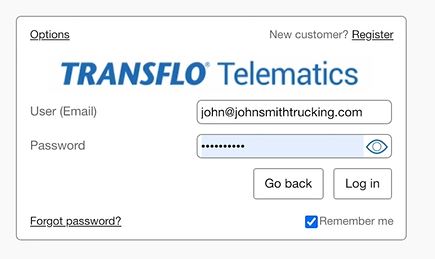
Attempt to log in to the Transflo Telematics web portal with the same credentials you use to log in to your existing Transflo applications.
-
If you cannot log in, the message Invalid user name or password appears.
-
Click Forgot password?
-
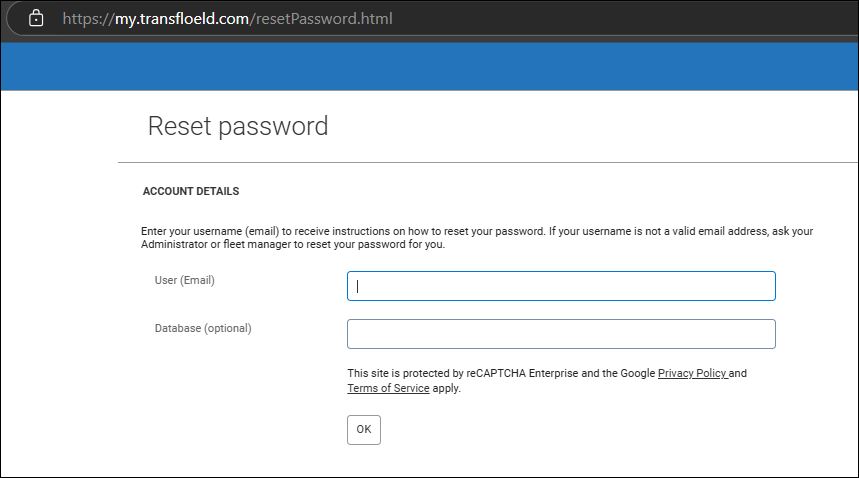
On the Reset Password page, enter your username (typically your email address) and database name if you know it. Click OK.
-
Check your email inbox for instructions to reset your password. The reset link will expire one hour from when it was sent.
-
If your username is not a valid email address in the system, ask your fleet administrator to reset your password.
Fleet Admins: Reset a Password or Unlock a Driver fleetadmin tfm
As a fleet administrator, you can reset a password, allow a user to reset their own password when they log in again, or unlock a user who has locked themselves out after too many bad guesses:
-
On your mobile device or workstation, launch a web browser app such as Edge, Chrome, Firefox, or Safari.
-
Log in to the Transflo Telematics web portal.
-
In the main menu, navigate to People, Users and Drivers.
-
Select a user in the table to open the Edit User page.
-
On the User tab, do one of the following:
-
If the User (Email) field is an email address, enable the Force password change on next login toggle. The user will receive an email with instructions on how to reset their password through their web browser. If you set the Force reset password function to No, you (the admin) can enter a password for the driver to use. For example, some fleets enforce a password convention (initials or unique numeric IDs) for all drivers and do not allow drivers to choose their own password. This practice can help reduce instances of forgotten passwords and minimizes the burden on drivers to set and remember their own passwords.
-
If the User (Email) field is not an email address, click Reset Password and specify a password that meets User account policy requirements.
-
-
Click Save.
-
If you just need to unlock a user:
-
In the main menu, navigate to People, Users and Drivers.
-
Select a user in the table to open the Edit User page.
-
Locked users have a red lock icon by their name. Administrators answering the call from locked users can unlock them by clicking the Unlock button.
-
In the resulting pop-up window, click Unlock to unlock the user, or Cancel to return to the User Edit page.
-
Keywords: password recovery how do i reset my password forgot password My account is temporarily locked due to unsuccessful attempt acount locked account locked for trying multiple times, driver can't get past login, Looped login after putting in credentials, "Force password change on next login" won't let you save and kicks you to login loop, I can't log into my account after creating my new password, I waited the Lock Out Period, still cant log in, I cant log in, no reset password option, I cant reset my driver password, I've attempted multiple logins and resets, unable to login, Why were my users locked out? Reset password, tried logging in then received error "max number of attempts was reached please contact support", I'm trying to see if I got locked out, I have been trying to log in to Geotab and changed my password but still get an error for login, I have to reset my password very often and it rarely seems to work, Having issues logging in to the online portal


