Open Transflo Mobile+ on Platform Science Tablets
An available integration between the Transflo Mobile+ app and Platform Science allows drivers to access Transflo document scanning and other features directly inside their Platform Science workflow application on a mobile phone or tablet.
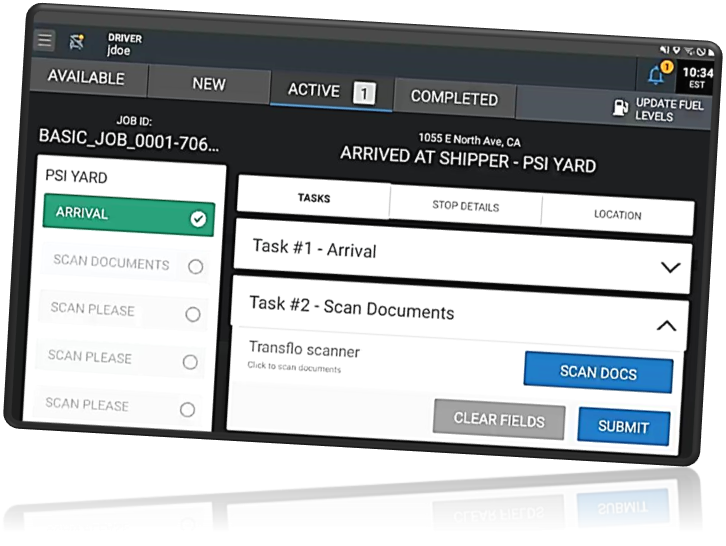
Integrated configurations also allow users to open Transflo Mobile+ as a standalone app inside of the Platform Science environment and can even automatically register and populate necessary fields. Certain Transflo customer fleet drivers with Platform Science tablets can now use their Platform Science single sign-on (SSO) credentials to register and launch the full suite of integrated Transflo Mobile+ product features. Additional integrated features became available for Platform Science users in the February 19, 2026 updated releases of Transflo Mobile+ 7.0.x and in-cab 6.5.15 for Android OS.
 Part 1: Administrators Configure User Data for Each Driver
This part is recommended because drivers sometimes struggle with the exact data needed for their e-mail or fleet ID. It is much easier if you set it up as an admin. However, if you do not pre-register the driver user data, it is possible for a driver to self-register if they enter the right name, e-mail, and fleet key name and key value pair.
-
As an administrator, install the latest Transflo Mobile+ app (as of February 2026, version 7.0.1.3 for Android OS, in-cab 6.5.15, or a newer SDK/APK) on each driver's tablet device where they are already running the Platform Science app.
-
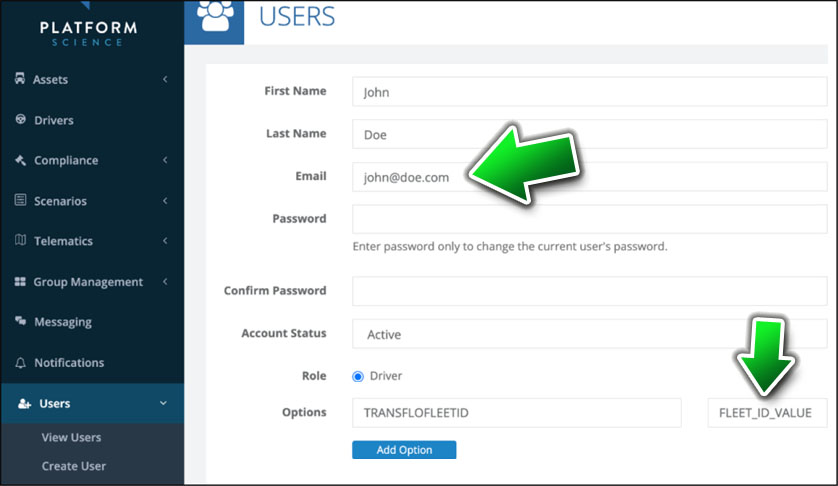
As an admin, verify the data for each driver is correct in the following fields on their user profile in the Platform Science Admin portal:
-
Email: The Transflo integration does not perform validation of email addresses, so ensure that driver email addresses are unique and accurate.
-
Options: Set the key value for the TRANSFLOFLEETID key name to your assigned Transflo fleet ID (contact your supervisor to get your fleet ID or see What is My Fleet ID?).
-
-
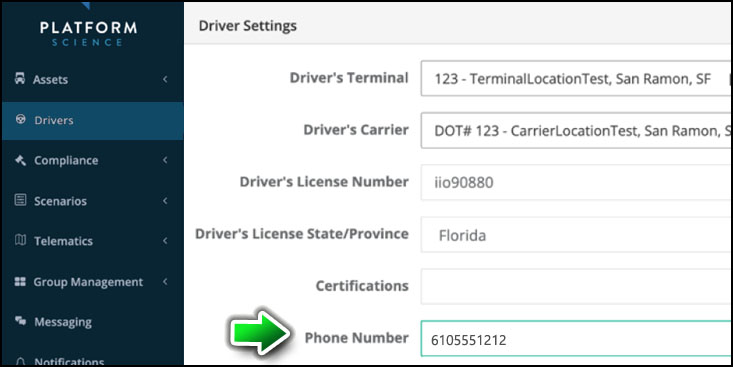
As an admin, verify the Phone Number field for each driver is correct in Driver Settings in the Platform Science Admin portal:
-
Have the driver launch their Platform Science app and follow the steps below to open the Transflo Mobile+ app inside Platform Science.
-
If a driver has not previously used the Transflo Mobile+ app, you might need to guide them to complete the registration process with the same information configured in the Platform Science administration portal. The integration between Platform Science and Transflo automatically registers users to the Transflo platform if they have not already registered. This is required in order to use Transflo Mobile+.
Part 2: Drivers Launch Transflo Mobile+ in the Platform Science App
-
Your administrator installs the Transflo Mobile+ app (version 7.0.1.3 for Android OS or an in-cab 6.5.15 or newer SDK/APK) on your tablet device where you are already running the Platform Science app.
-
As a driver, launch your Platform Science app on your tablet device.
-
If you have not previously used the Transflo Mobile+ app, complete the registration process with the same information configured in the Platform Science administration panel. The integration between Platform Science and Transflo automatically registers users to the Transflo platform if they have not already registered. This is required in order to use Transflo Mobile Plus. Verify your driver data is correct in the following three (3) fields (the data should match what your fleet admin has in the Platform Science Admin portal):
-
Email
-
Phone Number
-
Options: Set the key value for the TRANSFLOFLEETID key name to your assigned Transflo fleet ID (contact your supervisor to get your fleet ID or see What is My Fleet ID?).
The Transflo integration does not perform validation of email addresses, phones, or fleet IDs, so be accurate.
-
-
Close and re-launch the Platform Science app and log in to Platform Science with your Platform Science username and password. (Transflo Support cannot provide these credentials.)
-
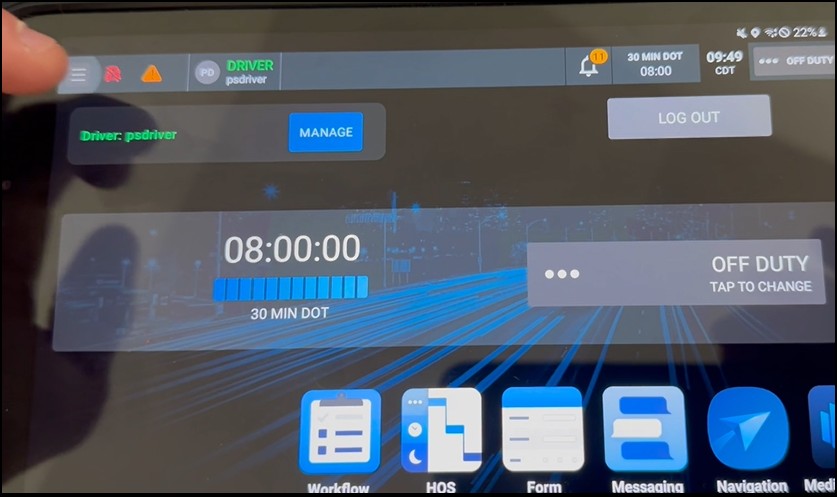
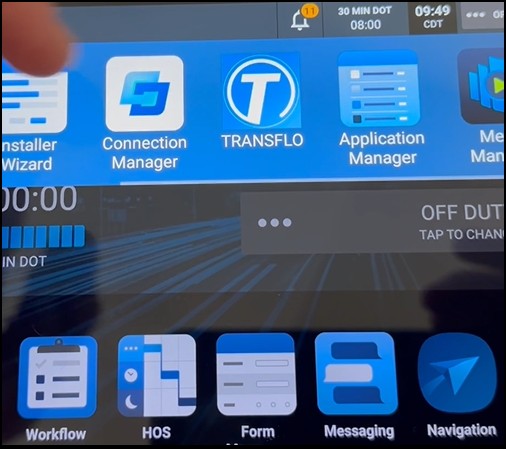
To launch the Transflo Mobile+ app from inside Platform Science, navigate to the app launcher and select the Transflo app icon:
-
Tap ≡Main Menu in the top-left corner.
-
Tap TRANSFLO.
-
-
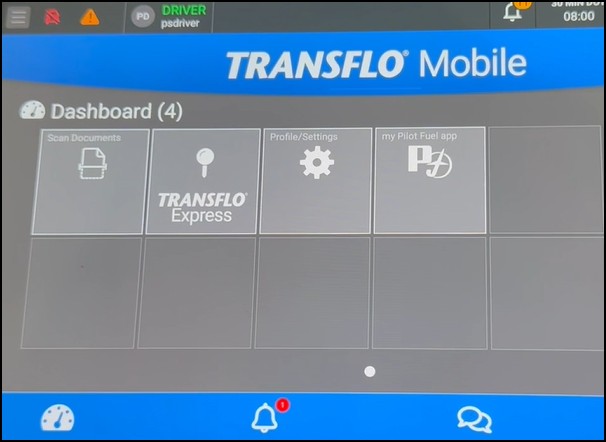
The Transflo Mobile Dashboard appears inside your Platform Science app. Tap an integrated Transflo feature such as Scan Documents or Transflo Express.
-
An available integration between the Transflo Mobile+ app and Platform Science allows drivers to access Transflo Document Scanning features directly inside their Platform Science workflow application on a mobile phone or tablet. In the example below, tap SCAN DOCS to go to Transflo Mobile+ document scanning.
Part 3: Learn More...
Drivers: To learn more about the Transflo document scanning options and other features, see Scan and Send Load Documents and other Transflo knowledge base (KB) articles.
Other Users: Platform Science workflow configuration documentation is also available for administrators, IT consultants, and fleet managers. Some of the steps and sample screens might also be helpful for drivers. To learn more, see Transflo Integration with Platform Science.


