Geotab ELD Diagnostics and Malfunction Codes [retail driver retailadmin administrator tfm hos-app]
As an admin or advanced user, use this article to troubleshoot problems, diagnostic errors, or malfunction event codes with your ELD, HOS, or telematics equipment.
Sometimes, users will ask, "Why does my ELD say no connection to the vehicle?" or "network connection not detected?"
-
Verify that your ELD has power and all 3 lights are lit up.
-
You might also need to reset the ELD using the Mobile+ app or Transflo HOS app.
 Try This First: Reset ELD or Refresh Configuration [retail fleet driver retailadmin administrator tfm hos-app]
To reset your device or refresh your configuration, follow these steps:
-
Open the Transflo HOS or Mobile+ user profile settings.
-
On the Mobile+ dashboard, tap
 User Settings in the top right corner of the screen to open the Settings screen.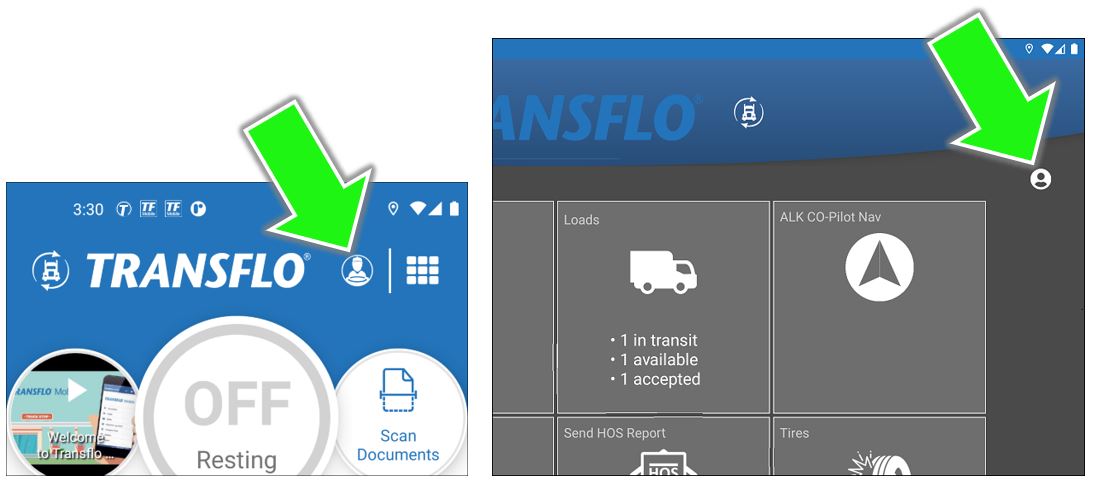
-
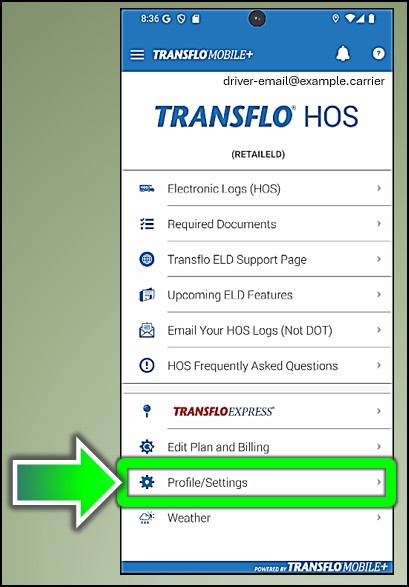
On the Transflo HOS app Home screen or dashboard, tap Profile/Settings.
-
-
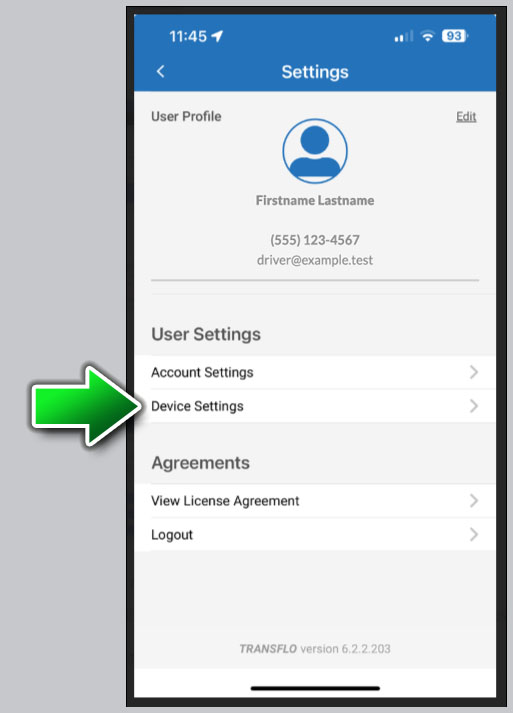
Tap Device Settings.
-
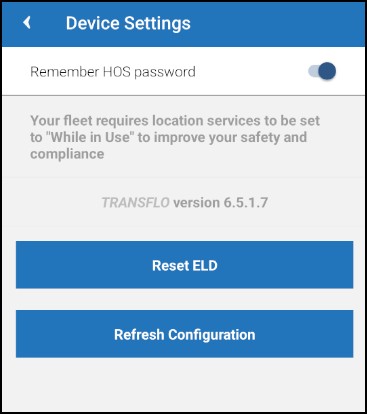
Tap Reset ELD or Refresh Configuration. Try just one option and see if that works for you. If not, repeat these steps later and try the other option. Try both options. Try logging out and logging back in again. Make a note of what works best for you. These options sometimes vary based on your device, mobile OS, app release version, ELD configuration, network access, and other system properties.
ELD Malfunctioning and May Be Out of Compliance... [retail fleet driver retailadmin administrator tfm hos-app]
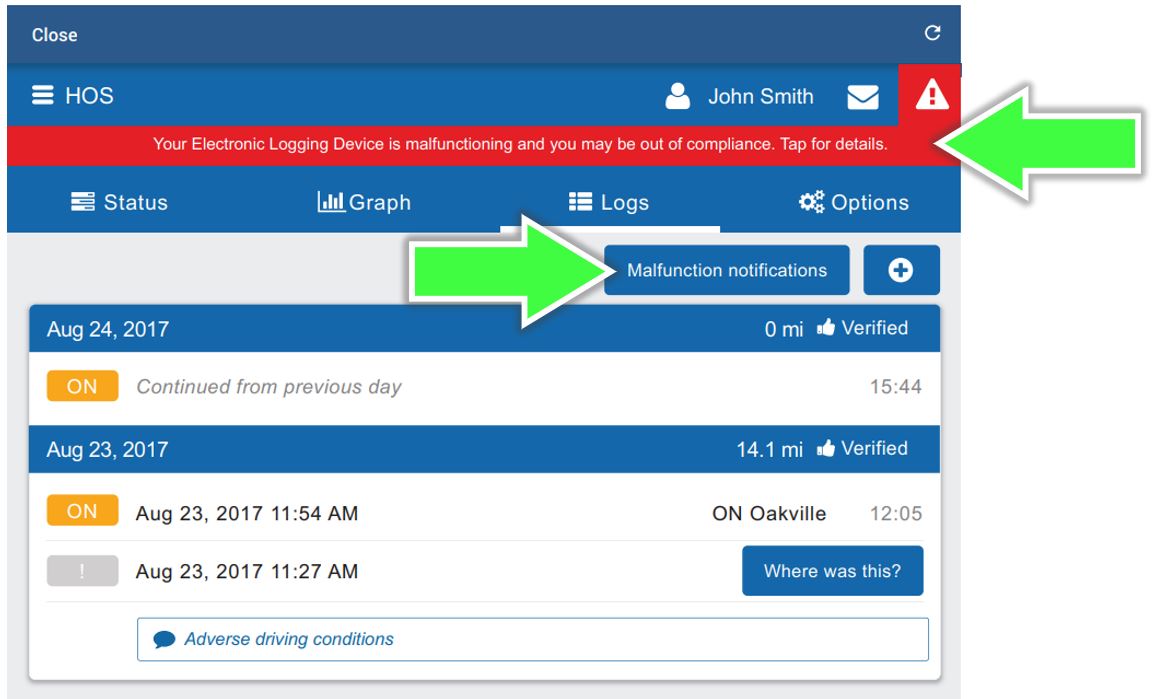
If your Transflo app shows the following red warning for your ELD, follow these steps to review the event codes and possible steps to fix the problem:
WARNING! Your Electronic Logging Device is malfunctioning and you may be out of compliance. Tap for details.
-
Tap the Malfunction Notifications button or the red bar.
-
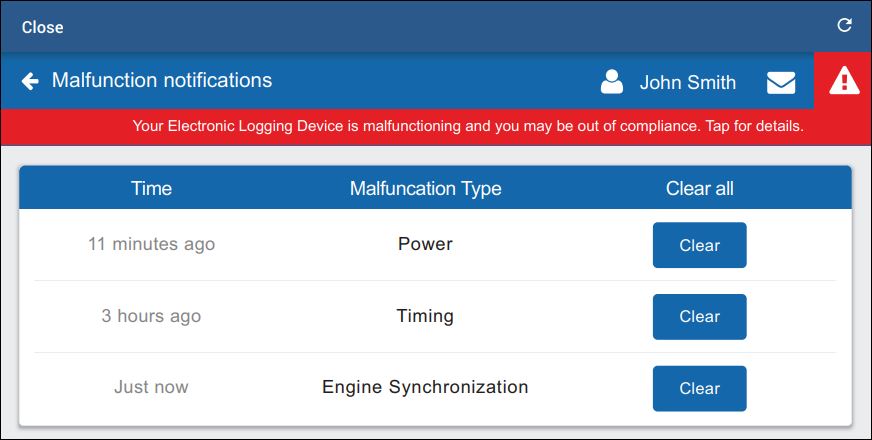
Review the malfunction type.
-
Review the diagnostic and malfunction code table on this page.
-
Investigate the issue and address the root problem.
-
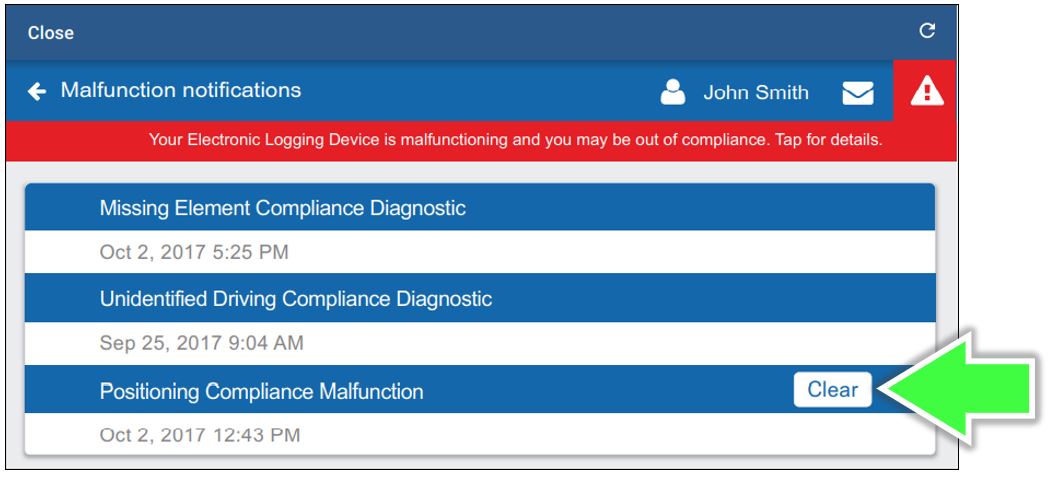
After the issue is resolved, the error notification typically clears itself. If not, press the Clear button.
-
Resume normal operation.
ELD Diagnostic Error Malfunction Codes [retail fleet driver retailadmin administrator tfm hos-app]
If you get a malfunction warning message as described above, review the following list of diagnostic codes (numbers) and malfunction codes (letters).
| Code: | Transflo ELD Malfunction Diagnostic Event: | Driver Steps to Resolve: |
|---|---|---|
| 1 |
Power data diagnostic: An ELD must monitor the data it receives from the engine ECM and data record history to identify instances when it may not have complied with the power requirements. |
This may be caused by an intermittent or disconnected connection to the vehicle ECM. This is likely due to an install issue. Once investigated, and the problem is resolved, the system will auto clear the event. |
| 2 |
Engine synchronization diagnostic: An ELD is required to establish a link to the engine ECM, and must record an engine synchronization data diagnostics event, when it no longer can acquire values for the ELD parameters required for records within five seconds. |
This may be caused by an intermittent or disconnected connection to the vehicle ECM. This is likely due to an install issue. This may also be caused if the ELD is unable to pick up the required engine data from the vehicle ECM. Contact your carrier if the problem persists. Once investigated, and the problem is resolved, the system will auto clear the event. |
| 3 |
Missing required data elements data diagnostic: An ELD must monitor the completeness of the ELD event record information in relation to the required data elements for each event type, and must record a missing data element and data diagnostics event for the driver, if any required field is missing at the time of recording. |
This code can occur when the ELD temporarily loses a GPS signal and the driver manually creates a log entry. If the driver does not enter an address manually when prompted by the Where was this? message, this diagnostic code is triggered. To resolve, select the Where was this? associated with the record and manually enter the missing data. Once investigated, and the problem is resolved, the system will auto clear the event. |
|
4 |
Data transfer data diagnostic: An ELD must implement in-service monitoring functions to verify that the data transfer mechanism(s) are continuing to function properly. An ELD must verify this functionality at least once every seven days. |
Check your internet connection. After the issue is investigated, and the problem is resolved, the system will auto clear the malfunction event. If problem persists, contact your carrier. |
|
5 |
Unidentified driving records data diagnostic: If more than 30 minutes of driving in a 24-hour period shows unidentified driver on the ELD, the ELD must detect and record an unidentified driving record data diagnostic event, and the data diagnostic indicator must be turned on for all drivers logged in to that ELD for the current 24-hour period and the following seven days. |
Review all unassigned logs when logging in or logging out of the vehicle and ensure you have claimed any logs that may be applicable to yourself. If the unassigned logs are not yours, you can ignore this diagnostic event. Please note this event will automatically clear itself as logs get claimed. |
|
6 |
"Other" ELD identified diagnostic: The other ELD identified is not supported. |
The other ELD identified is not supported. |
| E |
Engine synchronization compliance malfunction: An ELD must set an engine synchronization compliance malfunction, if connectivity to any of the required data sources is lost for more than 30 minutes during a 24-hour period aggregated across all driver profiles. |
This may be caused by an intermittent or disconnected connection to the vehicle ECM. This is likely due to an install issue. Contact your carrier to get the install inspected if you're unable to check yourself. Once investigated and the problem is found you may clear this event. |
| L |
Positioning Compliance malfunction: An ELD must monitor elapsed time during periods when the ELD fails to acquire a valid position measurement within five miles of the CMV's movement. When such elapsed time exceeds a cumulative 60 minutes over a 24-hour period, the ELD must set and record a positioning compliance malfunction. |
This can be caused by temporary or permanent loss of GPS by the Transflo HOS device. Contact your carrier to get the install inspected- If problem still persists, replace the Transflo HOS device. Once investigated and the problem is found you may clear this event. |
| O |
"Other" ELD identified malfunction: The other ELD identified malfunction is not supported. |
The other ELD identified is not supported. |
| P |
Power data malfunction: An ELD must monitor the data it receives from the engine ECM or alternative sources, and data record history to identify instances when it might not have complied with the power requirements. |
This may be caused by an intermittent or disconnected connection to the vehicle ECM. This is likely due to an install issue. Contact your carrier to get the install inspected if you're unable to check yourself. Once investigated and the problem is found you may clear this event. |
| R |
Data recording compliance malfunction: An ELD must monitor its storage capacity and integrity and must detect a data recording compliance malfunction if it can no longer record or retain required events, or retrieve recorded logs that are not otherwise cataloged remotely by the motor carrier. |
Contact your carrier to get in touch with Support as soon as possible. Once investigated and the problem is found you may clear this event. |
| S |
Data transfer compliance malfunction: After an ELD records a data transfer data diagnostic event, the ELD must increase the frequency of the monitoring function to check at least once every 24-hour period. If the ELD stays in the unconfirmed data transfer mode following the next three consecutive monitoring checks, the ELD must detect a data transfer compliance malfunction. |
Check your internet connection. If problem persists, contact your carrier. Once investigated and the problem is found you may clear this event. |
| T |
Timing compliance malfunction: The ELD must periodically cross-check its time with an external UTC source, and must record a timing compliance malfunction when it can no longer meet the underlying timing requirement of less than 10 minutes' time deviation. |
Check your mobile device phone time settings. Ensure it is set to acquire time automatically. Once investigated and the problem is found you may clear this event. |


