Known Issue: Missing Data After Mobile+ Migration from Loads 1.0 to 2.0 for Drivers
Use this KB article to troubleshoot potential known issues in the new 2026 Transflo User Workflow features (also known as Loads 2.0).
The new Load Overview screen data and labels for certain load data on this screen might have changed or simply been moved higher or lower on the screen. Use the following workarounds to scroll up or down to find the data. The load data might not be missing. The load information might simply have changed location on the screen.
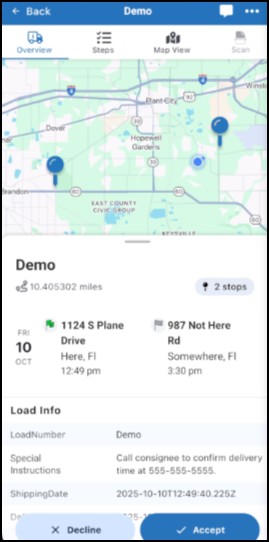
 New Load Overview Screen: Scan button is Missing
In the new load user workflows, a Scan button appears only when it is needed in the current step of the load workflow. It is not necessarily missing. The Scan button will re-appear when the driver needs to scan or upload a document to complete the current step in the load.
Recommended Workaround Steps
As a driver, complete each step in the load workflow. If the step requires document scanning, a Scan button will appear. It is not missing. It's placement on the screen has dynamically changed to guide drivers when scanning is needed.
Other Workaround Steps
-
Tap Back to exit the Loads feature.
-
In the main menu or dashboard, tap Scan Documents.
Fleet Configuration Option for Administrators
-
It is also possible to show or hide a persistent Scan button at the top of the new load screens. Instead of appearing only when needed in the current step, drivers will always see the Scan button.
-
As a fleet administrator, contact Transflo to advise them if you prefer to show or hide the persistent Scan button for your drivers instead of just showing the Scan option only if the current step needs it.
The configuration option name is disableStopScanButton and it has a Boolean value of Yes (disable/hide) or No (enable/show).
New Load Overview Screen: Missing Trip Number Under Load Status
Workaround: Drivers might need to scroll down to find the trip number. It is not missing. It's placement on the screen has changed.
New Load Overview Screen: Missing Freight Number Under Load#
Workaround: In some configurations, a Freight Bill Number appeared under a Load# field label. In these configurations, the Freight Bill Number now typically appears as the main Load Number or Load ID on the screen. It is not missing. It's placement on the screen has changed.
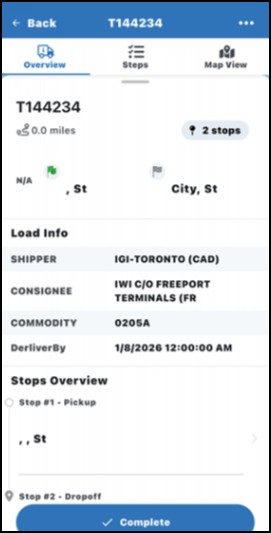
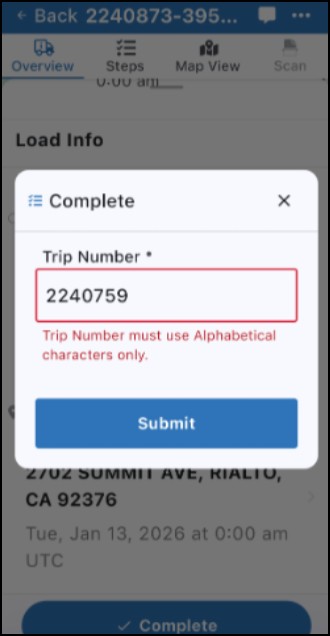
Trip Number or Other Required Field Won't Accept Numeric Digits
For this known issue, users might see the following error message in the steps of a new load workflow:
Trip Number [or other <Field Name>] must use alphabetical characters only.
Users cannot tap Submit. The field should accept numeric digits; however, the known issue does not accept the numeric data.
New! This known issue was already fixed and no longer requires a fleet-wide rollback from new user workflows to classic legacy loads (your fleet can now complete a successful migration from Loads 1.0 to Loads 2.0).
As of February 19, 2026, a hotfix was released for your Transflo Mobile+ app to correct this behavior:
-
7.0.3 for Apple iOS devices
-
7.0.1.3 for Android devices

Note: Minor known issues in the user interface, although inconvenient for some drivers, are not major bugs. The data and features are typically still available. The load data or button location might have moved. If you believe an important feature or data you previously had with Loads 1.0 is no longer available after your migration to the new Loads 2.0, try to apply one of the listed workarounds.
If you cannot find the data or button and believe it is blocking you from performing your job, escalate to your supervisor or fleet administrator. They can work with Transflo to resolve the issue in a configuration fix or future update. Only in the most severe cases, if warranted, your fleet leadership can request a temporary rollback from Loads 2.0 to 1.0 again. In 2026, the legacy load features will be discontinued and all fleets will eventually be migrated successfully to the new load workflow features.


