Pending in Early 2026 Shorten or Remove YM or PC Time in HOS Logs
Limited editing to time recently classified as Yard Move (YM) or Personal Conveyance (PC) will likely soon be permitted. In 2026, Geotab is expected to release a much-requested update to ELD Record of Duty Status (RODS) and hours-of-service (HOS) log functionality allowing limited edits to driver logs for mistakenly extended or entirely inaccurate yard moves (YM) or personal conveyance (PC) exemption time.
This upcoming feature will allow drivers or fleet administrators to edit eligible periods of YM and PC time. You can either shorten a portion of the original YM or PC time duration or, if allowed, remove it completely.
Example Only: Not Yet Implemented
-
As a driver, at some point in your normal work day when you need time for a personal conveyance or yard move exemption, launch the Transflo Mobile+ app and log in to HOS (tap HOS LOGIN).
-
Start an HOS exemption for a yard move (YM) or personal conveyance (PC) time. See Start or Stop a Personal Conveyance (PC) HOS Exemption [retail driver hos-app tfm].
-
If you later find that the YM or PC time logged was much longer than it should have been, you might be able to reduce the duration or remove it altogether (with this pending new feature expected in 2026).
Example A: Your logs show a YM or PC time duration of 90 minutes from 1:00 pm to 2:30 pm but you completed the YM or PC in 30 minutes. Solution: You want to shorten the YM or PC time from 90 to 30 minutes.
Example B: You started a YM and the system shows 90 minutes but you switched to Drive (D), left the yard for another active load, and never actually needed any YM or PC time. Solution: You want to remove the entire YM or PC log entry.
-
In Transflo HOS, Mobile+, the Geotab Drive app, or Geotab portal, log in and locate the YM or PC entry.
-
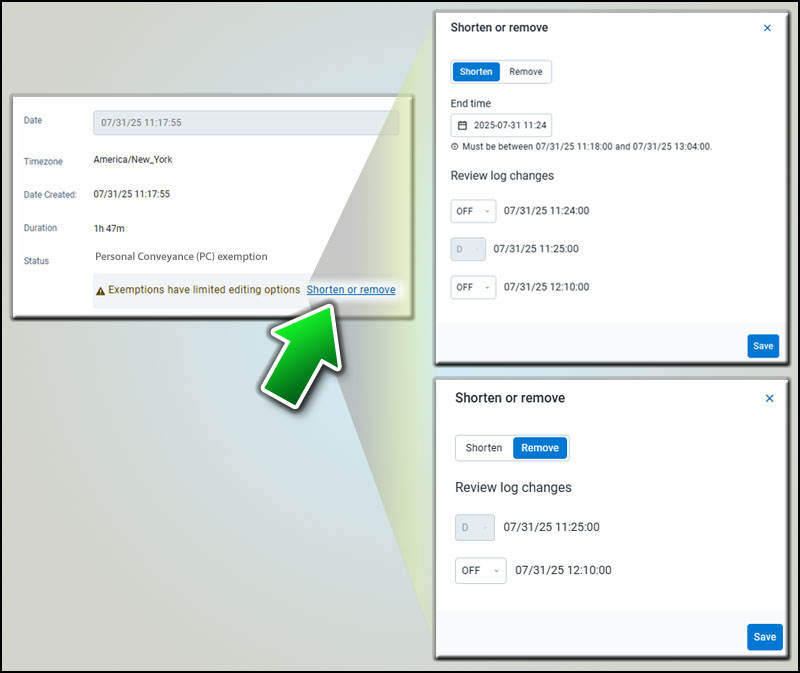
Tap Shorten or Remove.
-
To shorten the time duration, reduce the time for the YM or PC by indicating when it should have ended and switched your logs to another status such as OFF or Drive (D).
-
Shortening or removing time leaves a gap that must be filled. For example, if you shorten a PC event from 1:00 to 2:30 (90 minutes) to just 1:00 to 1:30 (30 minutes), you must specify what you as a driver did from 1:30 to 2:30. The original 90-minute PC time might be changed to 30 minutes of PC, 30 minutes in Drive (D), and 30 minutes OFF.
-
The back-end system tracks the periods of driving while in the YM or PC exemption and when the vehicle is stopped. When the vehicle is moving, the HOS status is Drive (D). If the vehicle was not moved for a period of time, the driver can be in any other standard status.
-
-
Review your changes (shorten or remove) and verify they are accurate.
-
When ready, tap or click Save.

Notes:
-
This feature has not been enabled but is tentatively expected from Geotab in 2026.
-
Shortening or removing YM or PC is not reversible.
-
You cannot extend or re-add YM or PC later.
-
Drivers can make their own edits in the Transflo Mobile+ app, Transflo HOS, or Geotab Drive.
-
Edits made by an administrator require the driver to accept the changes.
-
By default, all drivers and admins have access to this feature; however, a special clearance is available to restrict some users.
-
If a vehicle was driven during a YM or PC period, the only options are to leave it as-is, shorten it, or remove YM or PC and leave the driving time as-is (drive time is not editable).
-
You cannot switch Drive (D) time to YM or PC.
-
This KB article is based on 49 CFR 395.28 and supporting guidance provided by Geotab and FMCSA.


